HelpSettings
Alerts and page checks: hear about broken pages and bad weeks before they cost you
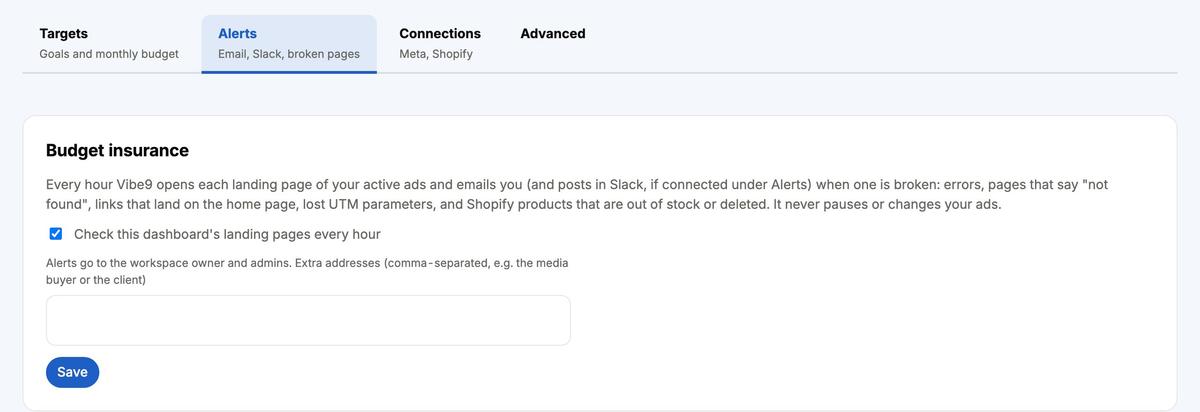
Where to find it Settings in the top bar, then the Alerts tab
Short answer In a dashboard's Settings, Alerts tab, Budget insurance opens every landing page of your active ads every hour and emails you when one is broken, out of stock or gone. Alerts sends one message a day when something changed (cost per new customer, worn-out ads, spend on existing customers, sales from views), plus a Monday brief. Both go to the owner and admins, extra addresses you add, and Slack if you connect it.
Where to find it
Click Settings in the top bar, then Alerts.
Owners and admins can change them, per dashboard.
Budget insurance: the hourly page check
Every hour, Vibe9.co opens each page your active ads link to, without running the page's scripts (so no pixel fires on your site). It flags:
| Problem | What it means |
|---|---|
| The page returns an error | An error code, such as 404 or 500. |
| The page does not load | No answer within 12 seconds, or the site can't be reached. |
| The link redirects in a loop | More than 6 redirects, or back to a page already visited. |
| The page says it was not found | The page title says not found, or a product or collection link lands on the home page. |
| UTM parameters are lost on the way | The link has utm_ tags and the page it lands on has none. |
| The product no longer exists / is out of stock | For Shopify product links. |
A failing page is checked again 20 seconds later and only counts if it fails twice. A site that refuses automated checks (401, 403 or 429) is noted as refused, not broken.
What happens when a page is broken:
- An email listing each broken page, the ads that send people there, what they spent in the last 7 days and a link to them in Ads Manager. A reminder follows once a day while it stays broken, and the next email says when it's fixed.
- Slack, if connected.
- A Fix action on Overview's Do this week and in Ads, Needs action.

It never pauses or changes your ads.
On the card: Status (on or off), Last check, and how many Landing pages were checked, broken or refused. When a page is broken, a table lists the Page, the Problem, the Ads sending people there and Since when.
The settings: Check this dashboard's landing pages every hour turns it on or off (on for new dashboards; switching it on checks straight away). Add up to 10 extra addresses, separated by commas, then click Save.
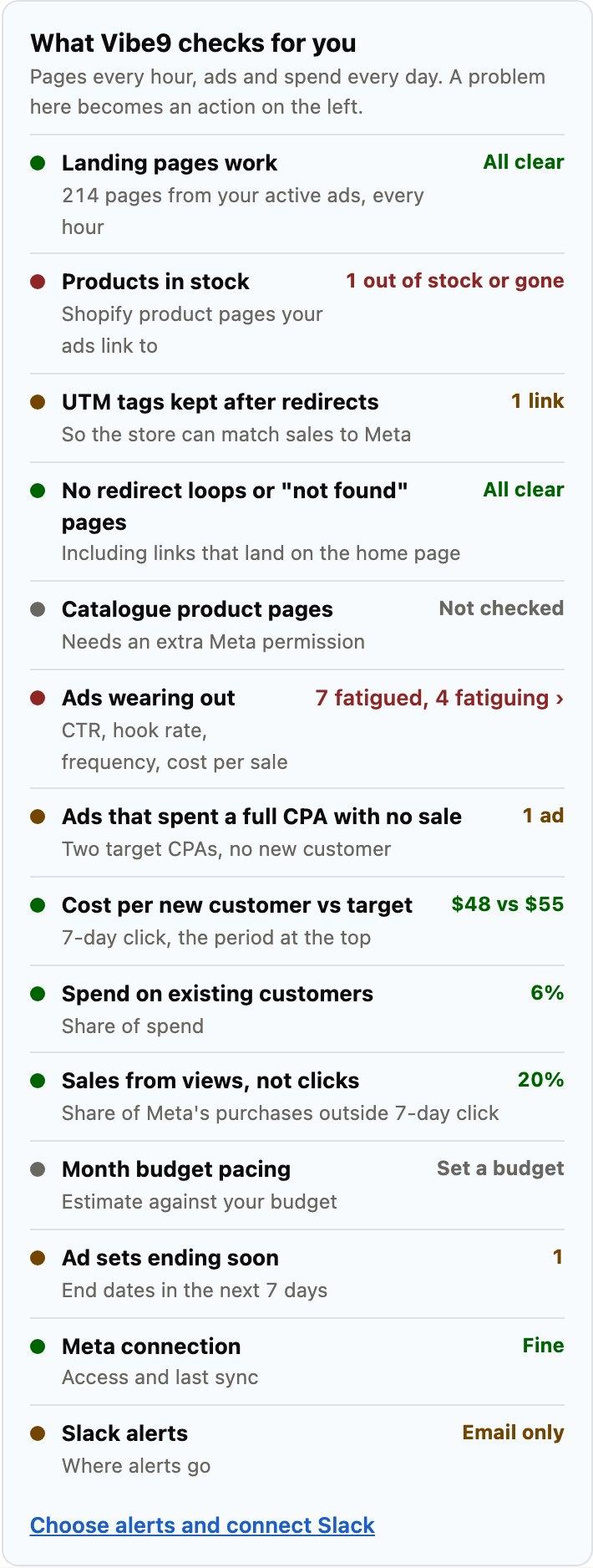
Big accounts: each check covers up to 300 pages, the 150 with the most spend in the last 7 days first. Catalog ads' product pages aren't checked yet.
What Vibe9.co checks for you
Overview lists every check next to Do this week: the hourly page checks and the daily ones, each with its result.
Alerts: one message a day
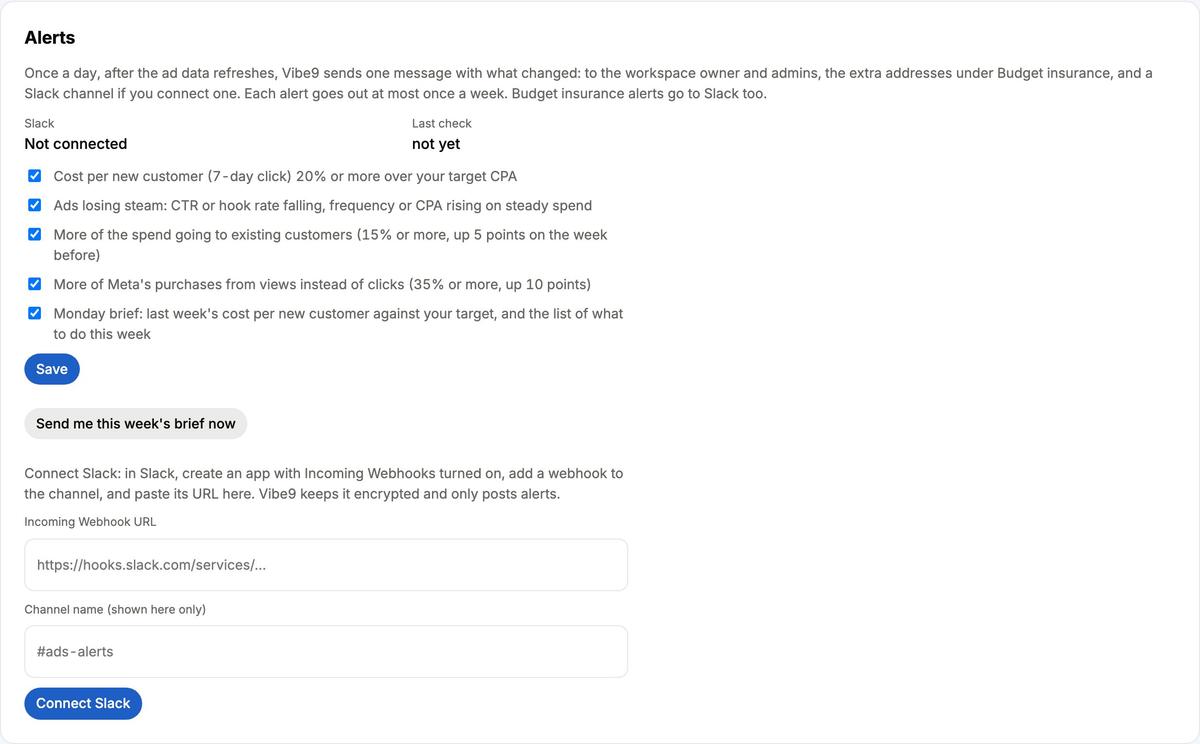
Once a day, after the ad data refreshes, Vibe9.co compares the last 7 complete days with the 7 before and sends one message with what changed. Each alert goes out at most once a week; excluded campaigns are left out. Tick the ones you want:
- Cost per new customer (7-day click) 20% or more over your target CPA, once new audiences spent at least two target CPAs in the week (or bought nothing).
- Ads losing steam: CTR or hook rate falling, frequency or CPA rising on steady spend. Up to 10 ads, each linked in Ads Manager.
- More of the spend going to existing customers: 15% or more of spend, and up 5 points on the week before.
- More of Meta's purchases from views instead of clicks: 35% or more outside 7-day click, up 10 points, from at least 10 purchases.
- Monday brief: last week's cost per new customer against your target and what to do this week, with the week's first sync (Monday, or Tuesday as a catch-up).
Each alert gives the number, the week before against now, and the one thing to do. Send me this week's brief now emails it to you alone. The card lists the last alerts sent.
Slack
In Slack, create an app with Incoming Webhooks turned on, add a webhook to your channel, and paste its URL (it starts with https://hooks.slack.com/services/) into Incoming Webhook URL. Click Connect Slack: Vibe9.co posts a first message to check it works, keeps the address encrypted and only posts alerts. Then you can Send a test to Slack, Replace webhook or Disconnect Slack.
What to do with it
- Leave the hourly check on and add your media buyer's address.
- When a Fix arrives, fix the page or change the ad's link that day.
- Read the Monday brief before you plan the week.
Good to know
- Recipients: the workspace owner and admins, plus the extra addresses. Members and clients get them only if you add their address.
- Nothing here changes your ad account. The alerts use the CPA target from the Targets tab.