HelpTeam and sharing
Billing: what Vibe9.co costs, the free trial, and how to cancel
Where to find it Billing, in the top bar (workspace Owner only)
Short answer You pay one price per dashboard, and one dashboard is one Meta ad account. Pay monthly or yearly. The first 14 days are free, and nothing is due when you start. Adding a dashboard is prorated, archiving one lowers the bill at the next renewal, and you can cancel in one click.
Where to find it
Click Billing in the top bar. Only the workspace's Owner sees it.
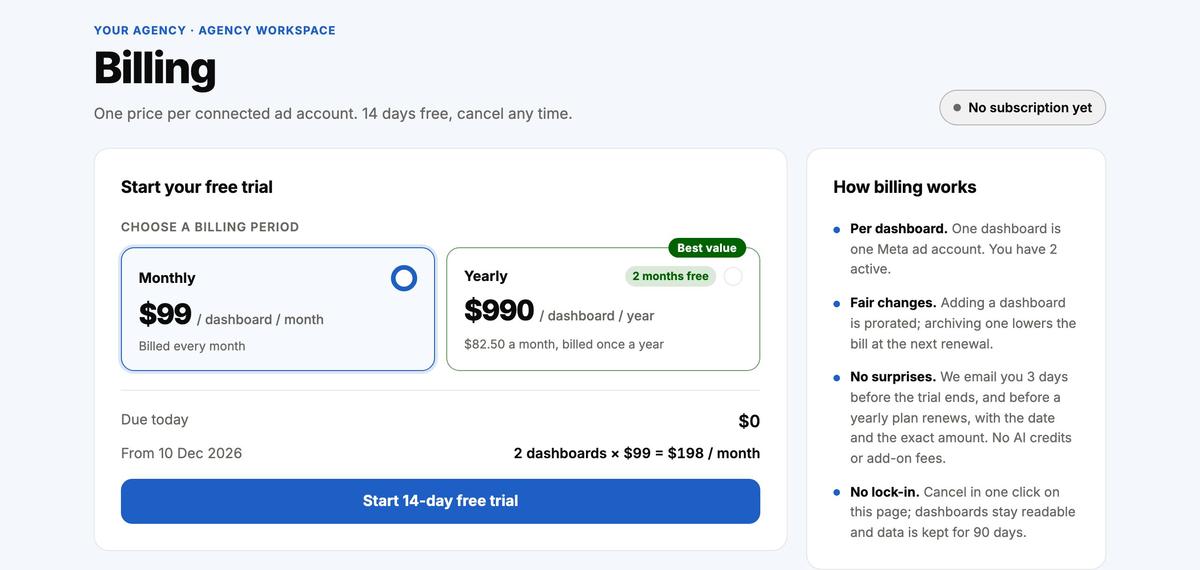
The price
- Per dashboard. Each dashboard is one Meta ad account. The bill is the price times your active dashboards (archived ones don't count, and it's never less than one).
- Monthly or yearly. At the time of writing the monthly price is $99 per dashboard. The yearly price is shown next to it, with how many months it saves against paying monthly. Prices are in US dollars, and the Billing page always shows the current ones (the pictures here are an example).
- No add-ons. No AI credits or add-on fees.
Under the plans, From (the day the trial ends) shows the sum for your dashboards, for example 2 dashboards × $99 = $198 a month.
The free trial
Click Start 14-day free trial. A card is required at checkout, which Stripe handles. Due today is $0. If you cancel before the trial ends, nothing is charged. We email you 3 days before the trial ends, with the date and the exact amount.
Until the Owner starts the trial, a workspace gets its first sync only: no scheduled syncs, refreshes or AI insights after that. Opening a dashboard takes the Owner to Billing; everyone else sees "This dashboard opens once the free trial has started."
Adding or archiving a dashboard
- Add one (or restore an archived one): the subscription goes up by one dashboard straight away, prorated for the rest of the current period.
- Archive one: the bill goes down at the next renewal. Nothing is refunded for the current period.
After you subscribe
The page shows your Status (Free trial, Active, Payment failed or Canceled), Dashboards billed and the next charge (After the trial during the trial, Next charge after it).
- Manage billing opens Stripe's secure portal: change your card, switch between monthly and yearly, or download invoices.
- Before a yearly plan renews, we email you the date and the exact amount.
Cancelling
Click Cancel subscription on the Billing page. It's one click:
- During the trial, you keep access until the trial ends and are never charged.
- On a paid plan, you keep access until the paid period ends. Nothing more is charged.
Changed your mind? Click Resume subscription before access ends, and nothing changes.
When the subscription has ended, the dashboards turn read-only and your data is kept for 90 days. Start a new subscription to resume syncing.
If a payment fails
The status shows Payment failed. Update your card (through Manage billing) within 7 days, or the dashboards go read-only. Data is kept for 90 days. While billing is paused, syncs and insights are off, and the numbers already there stay visible.
Good to know
- A store workspace runs one dashboard. An agency workspace pays for each active dashboard.
- Only the Owner can start, change or cancel the subscription.