GuidesCreative
How many new ad creatives should you make each month for Meta? A formula from your own numbers
Stop guessing creative volume. Work out how many new Meta ads to make next month from your budget, test rate, win rate and spend per winner, with a worked example.
On this page
Short answer Make enough new ads to replace the spend your current winners will lose next month. In one line:
Ads to make = (spend new winners must carry ÷ spend per winner) ÷ (test rate × win rate) × (1 + margin)
Every input comes from your own account. The rest of this guide explains each one, how to measure it, and a worked example. Rules of thumb like "10 new ads a week" ignore the two numbers that matter most: how many of your new ads Meta actually gives a real test, and how many of those win.
Why a fixed number doesn't work
Creative volume advice usually comes as a single number. The problem is that two accounts with the same budget can need very different volumes:
- One account's winners spend $10,000 a month each. Another's winners spend $2,000. The second needs five times as many winners to carry the same budget.
- In one account, Meta spends properly on a third of new ads. In another, on one in ten. The second has to launch three times as many ads to get the same number tested.
- Winners wear out. When an ad that carries 20% of your spend fades, something has to take its place, and you won't know which new ad that is until you've tested it.
So the right question isn't "how many ads do brands like mine make?" It's "how many winners do I need next month, and how many ads does it take me to find one?"
The five inputs
1. Spend new winners must carry
This is the part of next month's budget that today's winners won't cover. There are two ways to estimate it, and you take the larger:
- A refresh share: a fixed share of the budget you plan to hand to new ads each month. 20% is a reasonable starting assumption if you have nothing better.
- The wear-out gap: the spend currently carried by winners that are showing signs of fatigue (frequency climbing, CTR and conversion rate falling while spend holds). If those ads carry 30% of your spend, 30% of next month's budget needs new winners.
If you're raising the budget next month, the extra spend counts too: new budget needs new winners to carry it.
2. Spend per winner
How much one winning ad spends in a month in your account. Use the median monthly spend of your current winners, not the average, because one huge winner will skew it.
3. Test rate
The share of new ads that Meta actually spent enough on to judge. Most accounts launch far more ads than get a real test, because Meta's delivery concentrates spend on a few ads in each ad set.
A practical definition of "tested": the ad spent at least two times your target CPA. Below that, you can't tell a loser from an ad that never got a chance.
Test rate = ads that spent 2× target CPA ÷ ads launched (count only ads launched at least 7 days ago, so new ones have had their chance)
4. Win rate
The share of tested ads that became winners. Define a winner by your own target, for example: at least 5 purchases at or under your target CPA, on 7-day click attribution. If you track cost per new customer, use that instead of cost per purchase, because a winner that only sells to existing customers doesn't fill the top of your funnel.
Win rate = winners ÷ tested ads
5. Margin
Some ads get rejected, some get stopped early for brand or compliance reasons, some never launch. Add a margin, for example 15%.
Worked example
These numbers are illustrative, not a benchmark. Plug in your own.
| Input | Value |
|---|---|
| Next month's budget | $150,000 |
| Spend new winners must carry (20% refresh) | $30,000 |
| Median monthly spend of one winner | $6,000 |
| Test rate (ads that got 2× target CPA) | 28% |
| Win rate (tested ads that hit target) | 15% |
| Margin | 15% |
- Winners needed: $30,000 ÷ $6,000 = 5 winners
- Hit rate per ad launched: 28% × 15% = 4.2%
- Ads to test: 5 ÷ 0.042 = 119
- With the margin: 119 × 1.15 = 137 new ads
Run it with your own numbers in the free creative volume calculator.
That number surprises most teams. It isn't saying you need 137 new concepts. It's saying that, at your current hit rate, 137 launched ads is what it takes to find 5 winners. That's the real choice you face:
- Make more ads, often as variations of proven concepts (new hooks, formats and lengths), which is cheaper per ad.
- Raise the test rate, so more of what you launch gets a fair test (fewer ads per ad set, a dedicated testing campaign, enough budget per test).
- Raise the win rate, by making more of the concepts, angles and formats that already win in your account and fewer of those that don't.
Raising the hit rate from 4.2% to 6% cuts the same plan from 137 ads to 96.
Know the range, not just the number
If your account launched 40 ads last month and 2 won, your win rate is an estimate from a small sample. The true rate could easily be half or double that. Treat the result as a range, and size the brief for the cautious end if missing a month of winners would hurt.
Rule of thumb for sample size: below about 15 launched ads or 2 winners in your look-back window, your own rates are too noisy. Use conservative assumptions and say so in the plan.
Where to point the volume
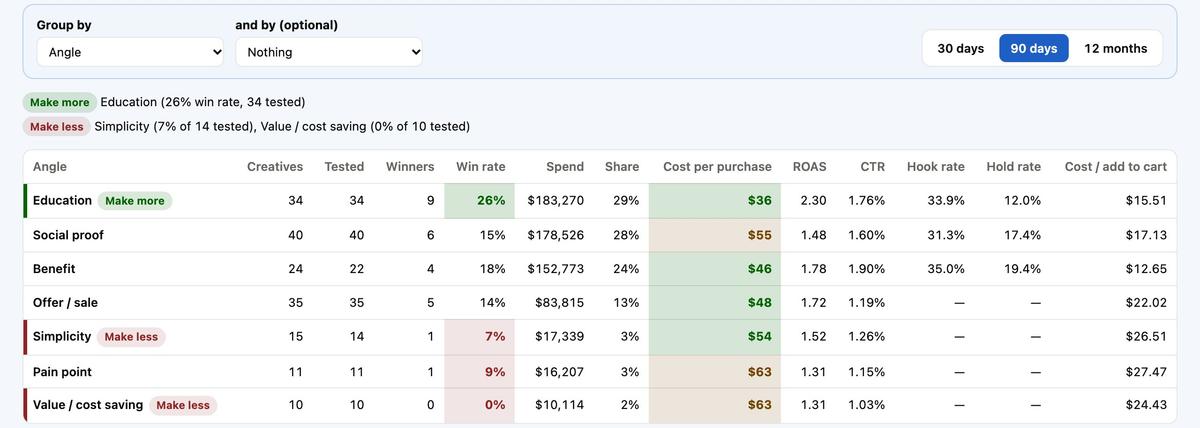
The formula tells you how many. Your creative reports tell you what. Group your tested ads by concept, angle, format and hook (most teams do this through a naming convention), and compare each group's win rate with your account's average:
- Groups with a clearly higher win rate across enough tests: make more of them.
- Groups with a much lower win rate across many tests: make fewer.
- Groups with too few tests to judge: keep testing a small share.
Common mistakes
- Counting launched ads as tests. An ad that spent $15 wasn't tested. Your win rate looks worse and your test rate is invisible.
- Judging winners on 1-day view or default attribution. View-through inflates purchases on ads that reach people who were going to buy anyway. Judge on 7-day click, and on new customers where you can.
- Using the average spend per winner. One hero ad inflates it and you under-brief.
- Planning on budget, not on winners. "We'll spend 10% on testing" doesn't say how many winners you'll get from it.
- Ignoring wear-out. If your top two ads are fading, next month's need is bigger than your usual refresh share.
How Vibe9 helps
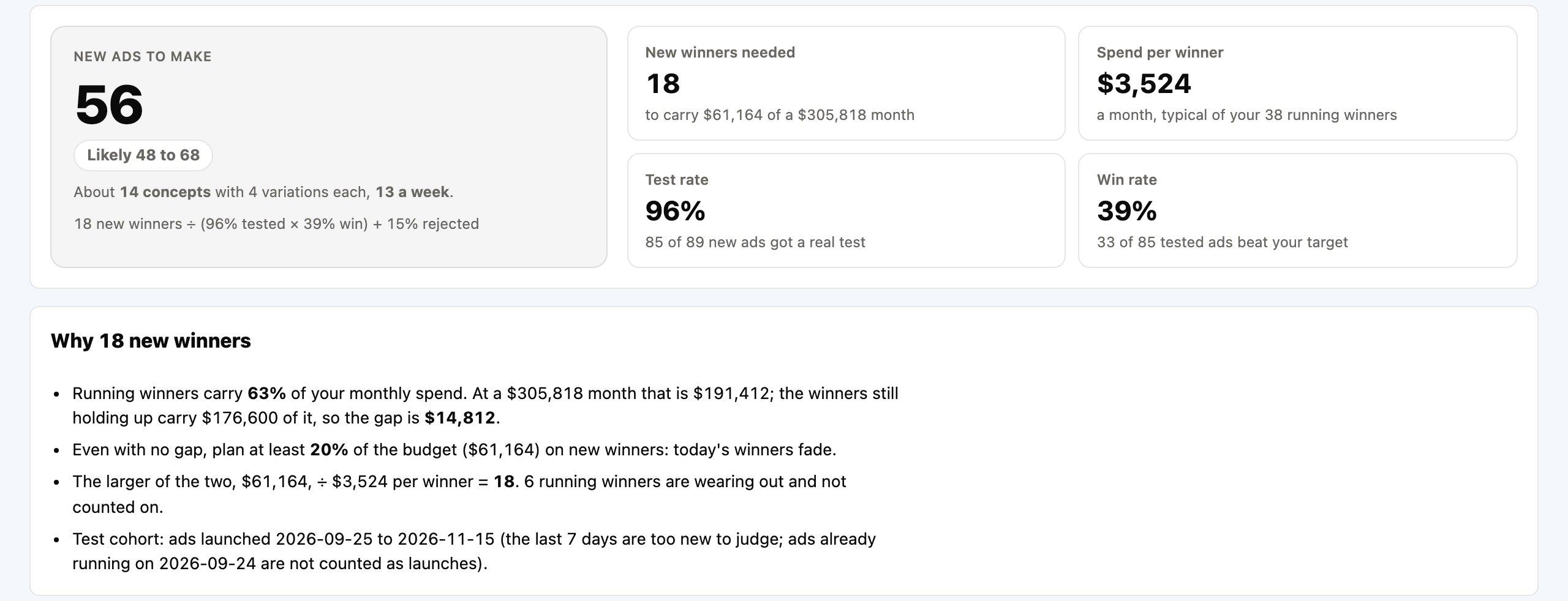
Vibe9's creative calculator runs this exact method on your own account:
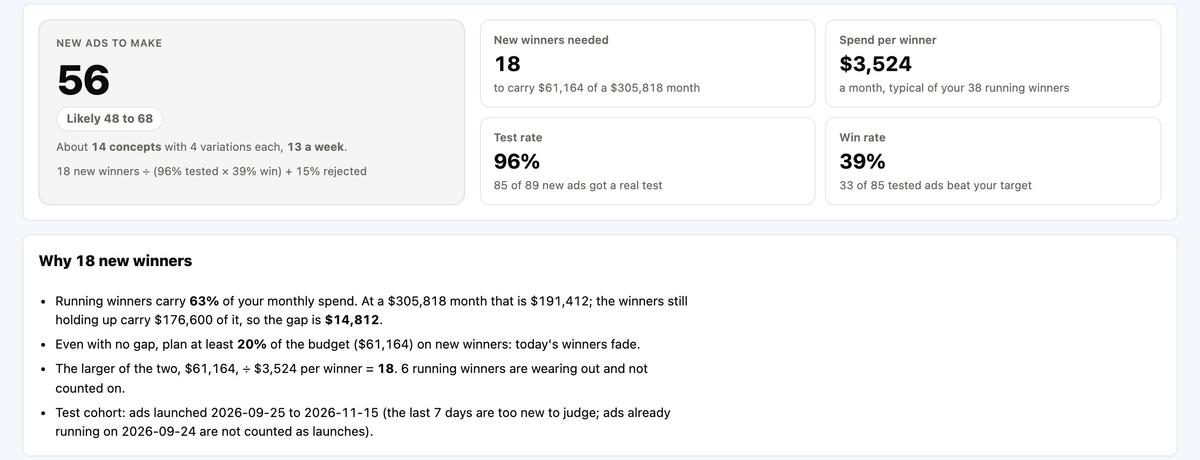
- It reads your ads' daily results on 7-day click, finds ads launched in the last 60 days, and measures your test rate (ads that spent two target CPAs) and win rate (5 or more purchases at or under target, judged on cost per new customer when Meta splits enough of it).
- It takes the spend per winner from the median monthly spend of your running winners, and the spend new winners must carry from your budget and the winners that are wearing out.
- It shows the number of ads to make as a likely range, with the maths behind it. Any input can be overridden, and with too small a sample it says so and uses stated defaults instead.
- It can split the plan by concept, format or any field in your naming convention, using the win rates from creative reports.
FAQ
How many new creatives should I launch per week on Meta? Divide the monthly result of the formula by four. There's no universal weekly number, because it depends on how much one winner spends and how often your ads win in your account.
What is a good creative win rate on Meta? There's no reliable public benchmark, because every team defines a winner differently. Measure your own with a fixed definition (for example 5+ purchases at or under target CPA, on 7-day click, among ads that spent at least 2× target CPA) and track whether it improves month on month.
How much should I spend to test one creative? Enough for the ad to show whether it can hit your target. A common threshold is two times your target CPA. Below that, you're mostly measuring noise.
Does this work for small accounts? The logic does. The measurement doesn't, if you launch only a handful of ads a month. Use conservative assumptions until you have at least 15 launched ads and 2 winners in your look-back window.
Should variations of one concept count as separate ads? Count them as separate ads for the volume, because each needs its own test. Group them by concept in your reporting, so you can see which concepts win.
Plan next month's creative
You can run this formula in a spreadsheet today with numbers from Ads Manager. If you'd rather have it measured from your account every month, with the range and the split by concept, Vibe9 does it for you. Request beta access.