GuidesWasted spend
How much of your Meta budget goes to existing customers? How to check it and limit it
Meta removed the existing customer budget cap. How to see what share of spend reaches people who already bought, what a healthy share looks like, and the ways to limit it now.
On this page
Short answer Use the audience segments breakdown in Ads Manager to see spend and purchases for the new audience, the engaged audience and existing customers. Meta removed the existing customer budget cap from Advantage+ sales campaigns, so limiting that spend now takes one of three routes: exclude existing customers, put them in a separate ad set with a spending limit, or use the "Acquire new customers" setting. Before you limit anything, check whether that spend is incremental. Purchases from people who already buy from you make ROAS look great and grow the business very little.
Why Meta spends on existing customers
Meta's delivery looks for the cheapest purchases it can find. People who already bought from you are the most likely to buy again, so a campaign optimizing for purchases drifts toward them unless you tell it otherwise. That's especially true for broad and Advantage+ sales campaigns.
The result looks good in Ads Manager (low CPA, high ROAS) because many of those people would have bought anyway, from your email, an SMS or a direct visit.
What changed: the existing customer budget cap is gone
Advantage+ sales campaigns used to have a setting that capped the share of budget spent on existing customers. Meta now says: "Existing customer budget cap ... is no longer available. You can still do the same thing manually" (Meta: existing customer budget cap). The developer documentation says campaigns that still use the old field keep working only until a later API version (Meta: Advantage+ campaigns).
How to check your share of spend on existing customers
Step 1: Define the segments
In Advertising settings > Audience segments, define your existing customers (for example your Shopify customer list and a purchase-based website audience) and your engaged audience (Meta: set up audience segments). Meta applies the definitions to all sales campaigns in the ad account. Segments count from the day you save them.
Step 2: Break down your sales campaigns
In Ads Manager, select your sales campaigns and a closed date range, then Breakdown > By Demographics > Audience segments (Meta: audience segments reporting). Add 7-day click purchases with Compare attribution settings.
Step 3: Calculate three numbers
| Number | Formula |
|---|---|
| Share of spend on existing customers | Existing-customer spend ÷ total spend |
| Share of purchases from existing customers | Existing-customer purchases ÷ total purchases (7-day click) |
| Cost per new customer | New-audience spend ÷ new-audience 7-day click purchases |
Step 4: Look at it per campaign and per ad
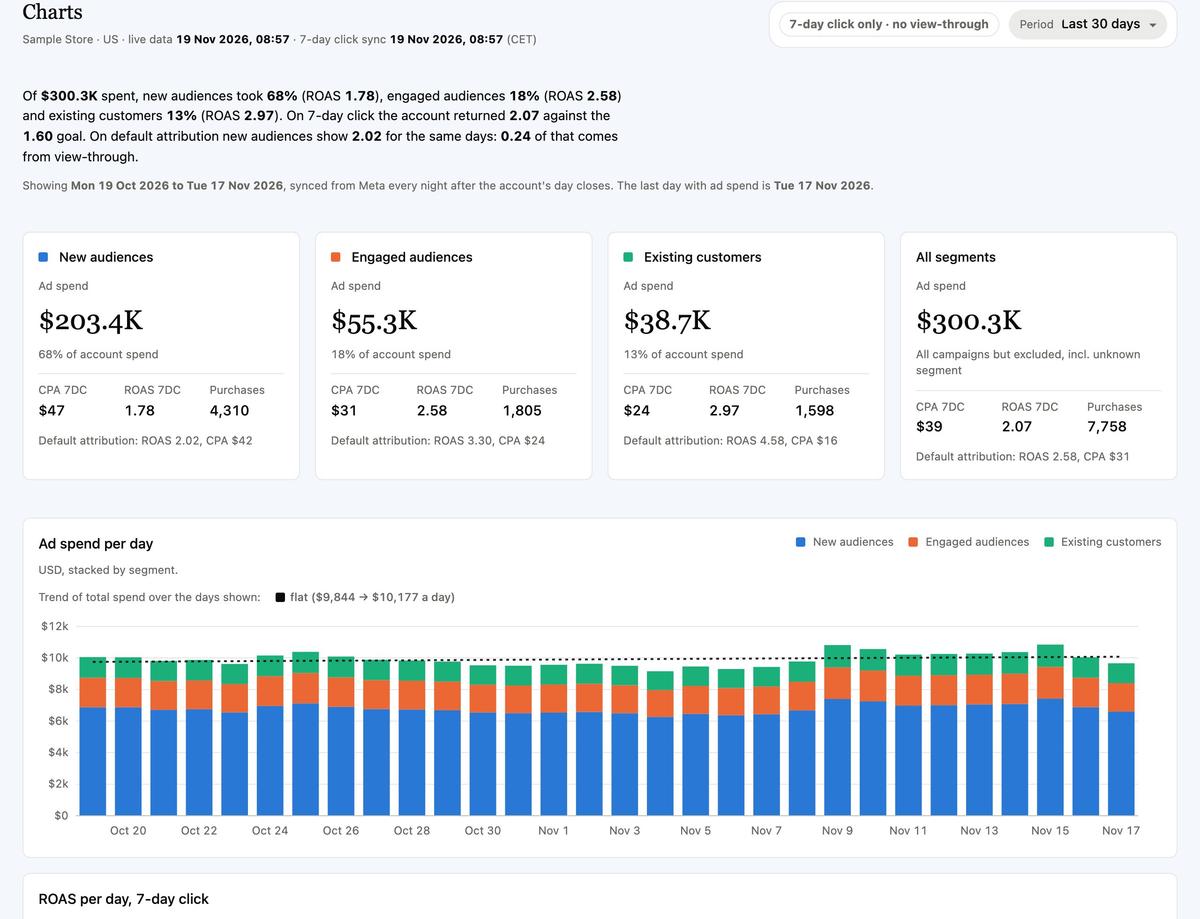
The account number hides where the spend goes. A prospecting campaign where a big share of spend reaches existing customers isn't really prospecting. Do the same breakdown at ad level: some ads, often those with discount or brand-heavy messaging, pull mostly from people who already know you.
What share is healthy?
There's no single right number. It depends on how big your customer base is, how often people repurchase and whether you sell consumables. What matters:
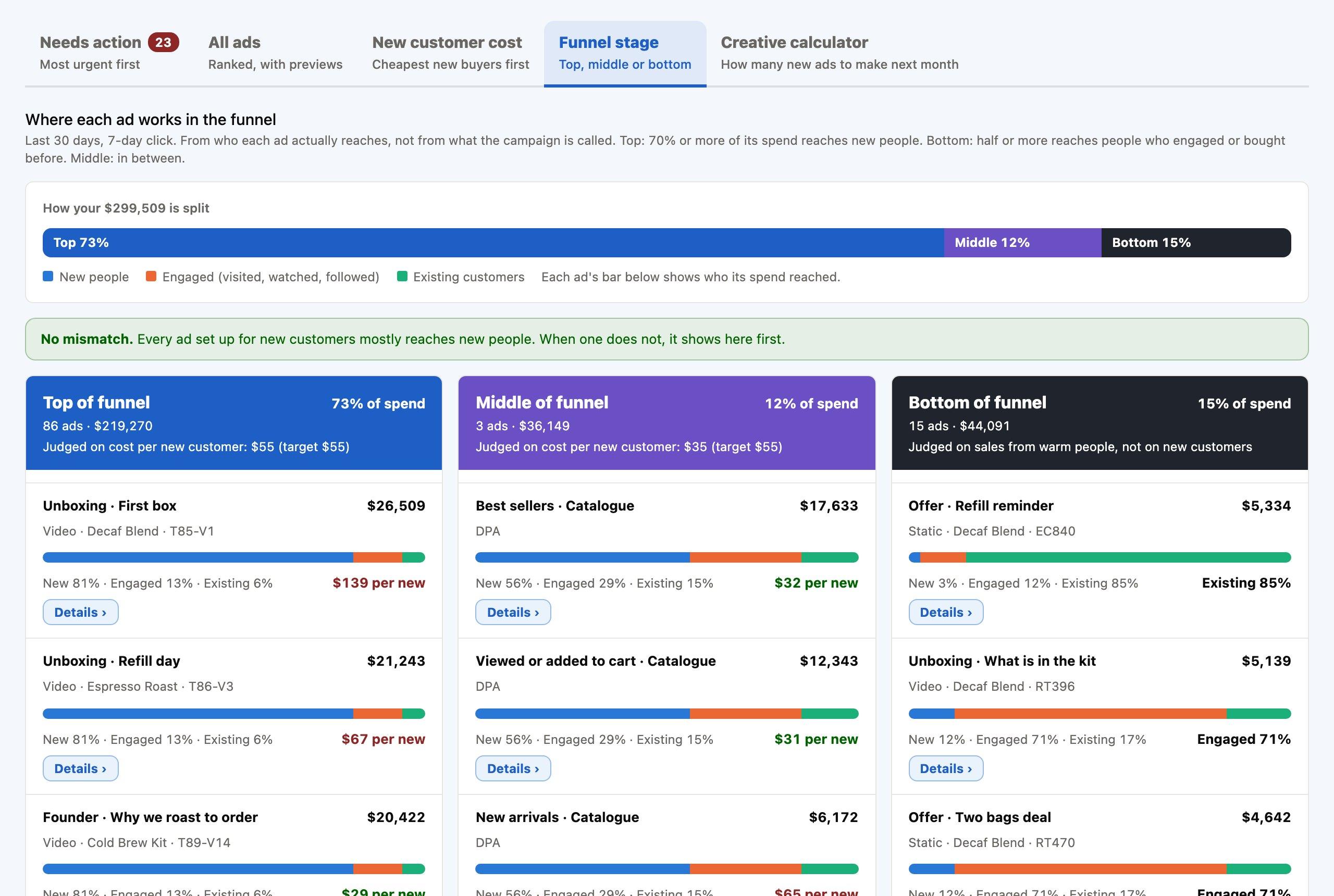
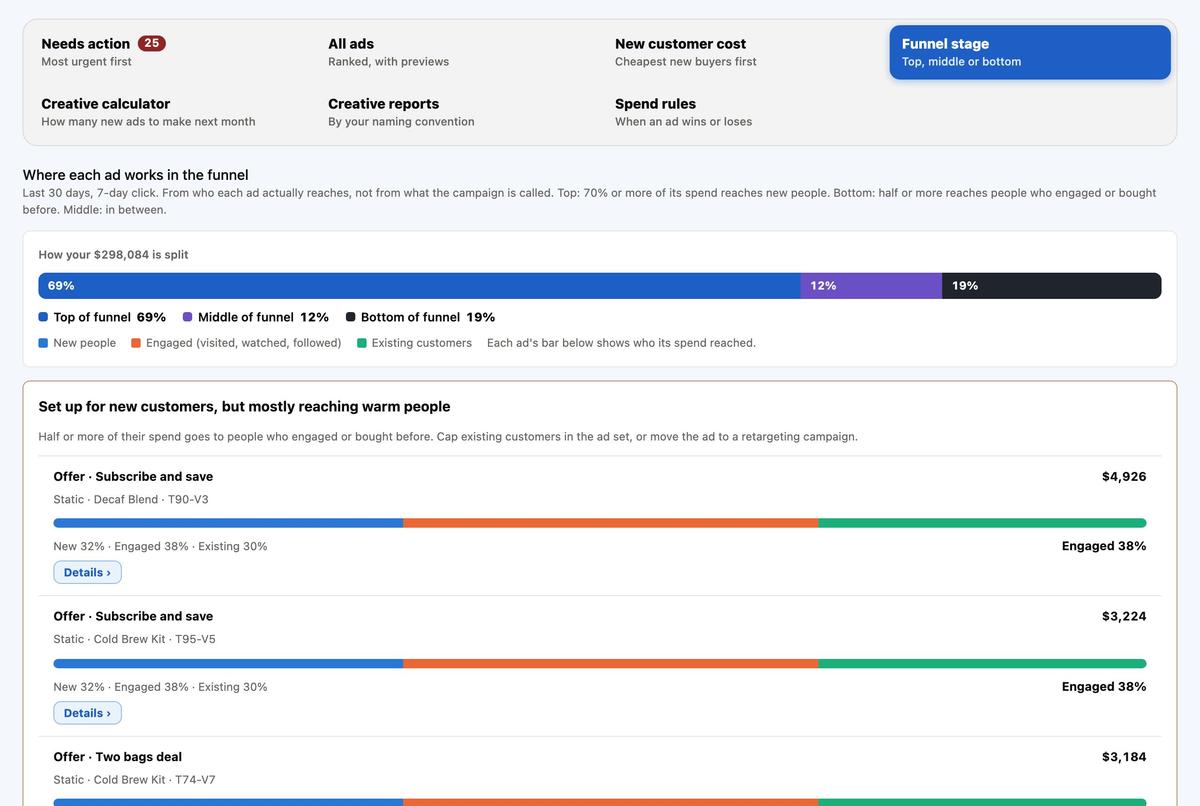
- For prospecting campaigns, most spend should reach the new audience. One practical rule: treat an ad as top of funnel only if 70% or more of its spend reaches new people.
- For the account, set a ceiling for existing-customer spend that you'd defend to your finance team, and track it monthly.
- Watch the trend. A share that creeps up month after month, while ROAS improves and new customers don't grow, is the pattern to act on.
Three ways to limit it
Meta lists the manual options in the same help article as the removed cap (Meta: existing customer budget cap):
1. Exclude existing customers
Exclude your existing customer audience from prospecting ad sets. Simple and blunt: you won't reach them at all with those ad sets. Exclusions are never perfect, because your customer list won't match every person on Meta.
2. Two ad sets with a spending limit
Run new and existing customers in separate ad sets, and put an ad set spending limit on the existing-customer one. This gets you closest to the old cap.
3. Customer lifecycle strategy
In sales campaigns, the ad set setting can be "Get conversions from all audiences" or "Acquire new customers" (Meta: customer lifecycle strategy). With "Acquire new customers", Meta focuses delivery on people who haven't bought. Trade press (for example Jon Loomer) reports newer accounts seeing automatic exclusions based on purchase data; check what your account shows before you rely on it.
Whichever you choose, measure the result with the breakdown above for a few weeks. If cost per new customer doesn't improve, the existing-customer spend was not your main problem.
Is that spend wasted?
Not always. Some existing-customer purchases wouldn't have happened without the ad, for example a new product launch to past buyers. The question is how many. Two ways to find out:
- A holdout or lift test: exclude existing customers from all ads for a few weeks, and watch whether their repeat purchases in Shopify drop.
- Compare ROAS by segment on 7-day click: if existing-customer ROAS drops sharply when you remove view-through, much of it was people buying anyway.
Common mistakes
- Judging retargeting and prospecting on the same CPA. Retargeting will always look cheaper.
- Excluding customers without measuring before and after. You won't know whether it helped.
- Forgetting segments only count from the day they're saved. Earlier spend shows as unknown.
- Reading only the account total. One campaign can carry most of the existing-customer spend.
How Vibe9 helps
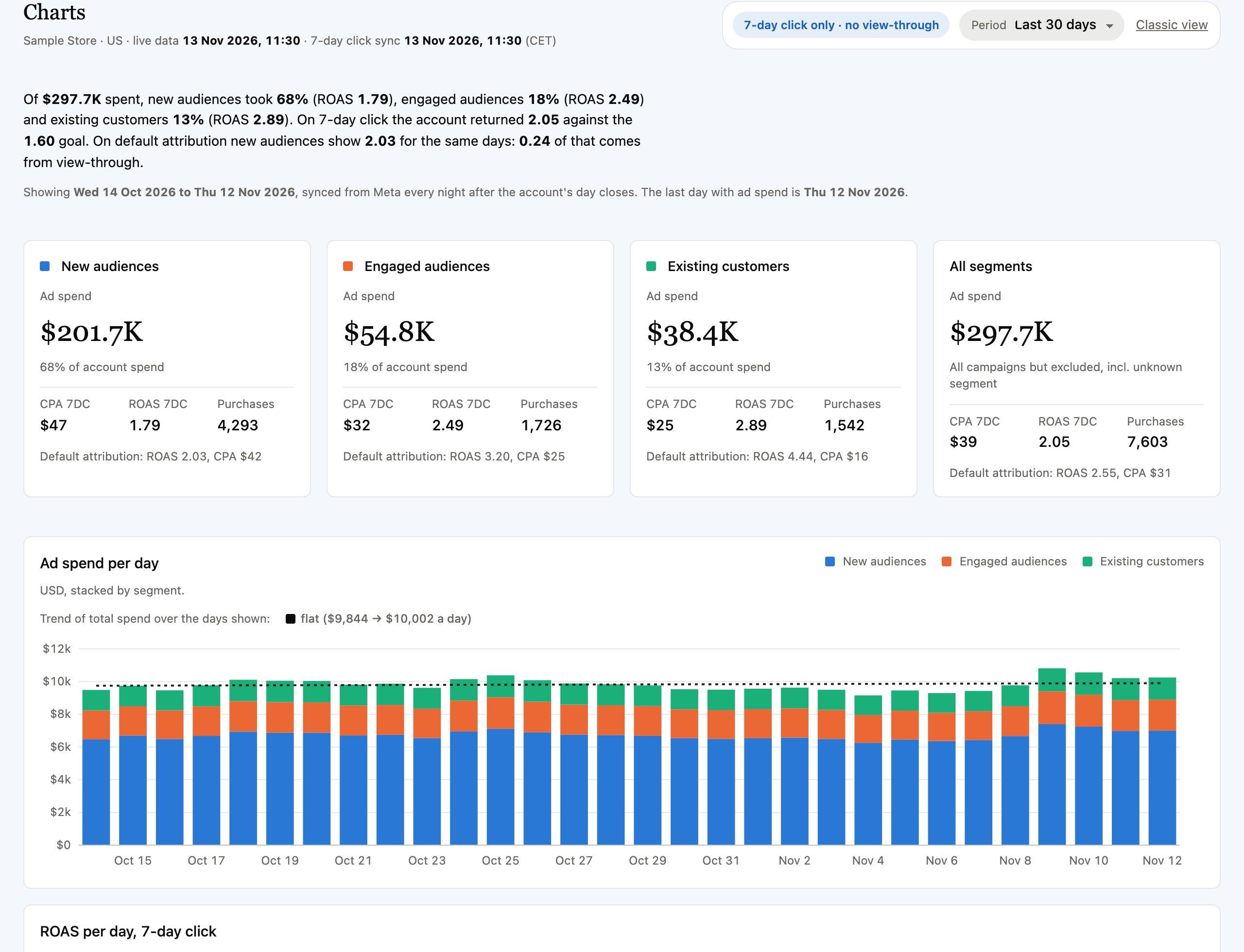
- Customer types: spend, CPA and ROAS for new, engaged and existing customers, and how much of Meta's ROAS is only view-through.
- Share of spend going to people who already bought from you, on the overview, every day.
- Funnel stage for every ad: each ad's spend split into new, engaged and existing customers, with prospecting ads that mostly reach people who already know you flagged.
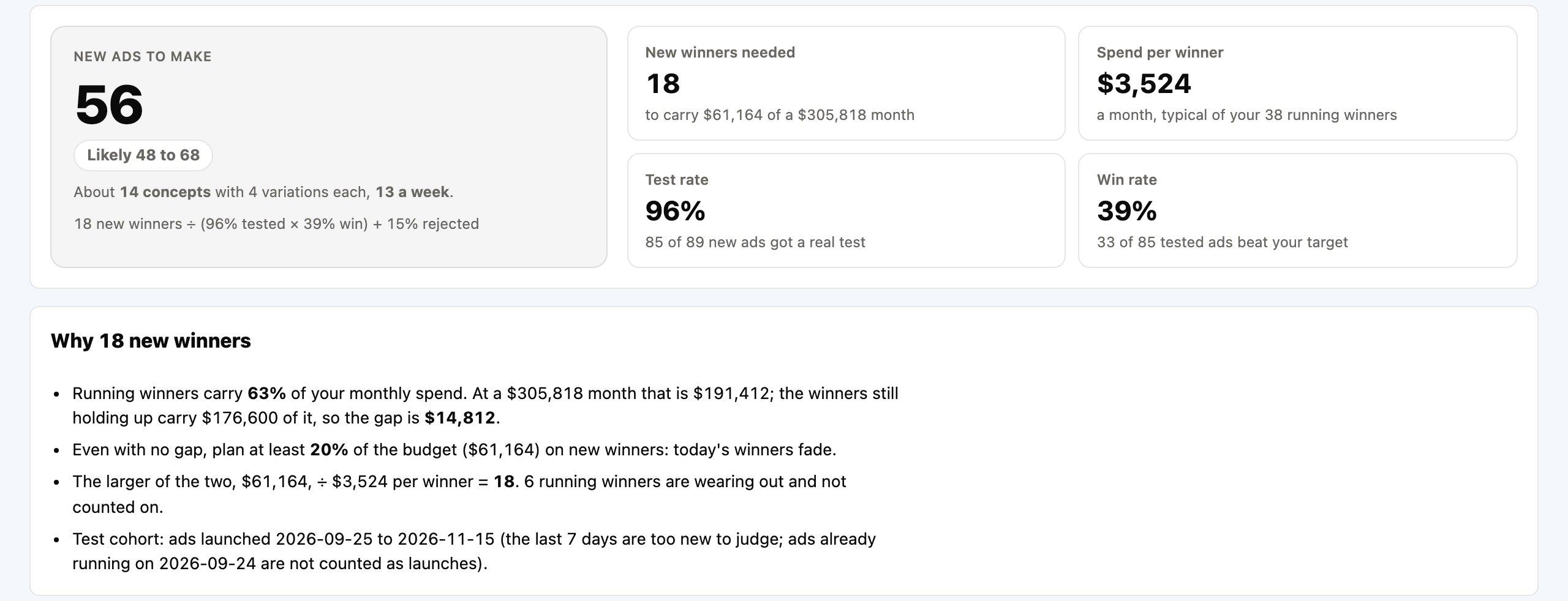
- Cost per new customer against your target, on 7-day click, so you can see whether limiting existing-customer spend actually made acquisition cheaper.
- Brand or retention campaigns left out of every number, if you choose.
Vibe9 has read-only access to Meta. It shows you where the budget goes; you decide what to change.
FAQ
Why is my Advantage+ sales campaign spending so much on existing customers? Because they're the cheapest purchases to find, and the budget cap that used to limit this was removed. Use the audience segments breakdown to measure the share, then exclude, split or switch the ad set to "Acquire new customers".
What happened to the existing customer budget cap? Meta says it's no longer available and that you can do the same thing manually: exclude existing customers, or put them in a separate ad set with a spending limit.
Can I see new vs existing customer spend in Ads Manager? Yes, through Breakdown > By Demographics > Audience segments, on sales campaigns, once your engaged audience and existing customers are defined in Advertising settings.
Does excluding existing customers hurt performance? Reported ROAS usually drops, because the cheapest purchases are gone. Judge the change on cost per new customer and on total new customers in Shopify, not on ROAS.
Should I run any ads to existing customers? Often yes, for launches, replenishment and win-back. Keep them in their own ad sets with their own budget and goals, so they don't hide inside your prospecting numbers.
See where your budget goes
The breakdown above takes about 15 minutes to do by hand. If you'd rather see the share of spend on existing customers every day, with each ad's funnel stage, request beta access.