GuidesWasted spend
Meta ads sending traffic to sold-out or broken pages: how to find and fix them
Sold-out products, deleted pages and lost UTMs quietly burn Meta budget. A step-by-step check for every active ad's landing page, and how to automate it.
On this page
Short answer Meta reliably keeps out of your ads only catalog products marked out of stock in your catalog. Its ad review can also reject an ad that links to a page that doesn't work, but it doesn't promise to catch every one. Most other problems keep spending. A sold-out Shopify product page still loads, so Meta sees nothing wrong. A deleted product, a renamed URL handle or a redirect that strips your UTM parameters can run for days before anyone notices. The fix is a routine: list the destination URL of every active ad, check each one, and pause or relink the ones that fail. Below is how to do it by hand in about 30 minutes, and how to automate it.
Why this happens more often than you'd think
Most Shopify brands running Meta at scale have dozens of active ads pointing at individual product pages, collections and promo pages. Those pages change all the time, and the ads don't know.
The usual causes:
- The product sold out. Shopify keeps the page live and shows a "Sold out" button. The page returns a normal 200 response, so no tool that only checks for errors will flag it.
- The product was deleted or set to draft. The URL now returns a 404.
- The URL handle changed. Someone renamed the product and Shopify's "create a URL redirect" box wasn't ticked, so the old link breaks.
- A promo or collection page was removed after a sale ended, while the ad that pointed at it kept running.
- A redirect lands on the home page. Some redirect setups and apps send dead links to the home page. The page loads fine, but the person who clicked a product ad now has to search for it.
- UTM parameters get lost. A redirect on the way drops the query string, so the visit lands without
utm_sourceorutm_campaign. The ad still sells, but your analytics stop crediting it, which widens the gap between Meta and Shopify. - The site is slow or down during a theme change, an app conflict or a hosting incident.
What Meta does and doesn't catch
It helps to know where Meta's own protection ends.
| Situation | Does Meta stop the ad? | Source |
|---|---|---|
| Catalog (Advantage+ catalog) ad, product marked out of stock in the catalog | Yes, out-of-stock items "don't display at all in your ads" | Meta catalog fields |
| Catalog ad, product sold out on Shopify but the catalog hasn't synced yet | Not until the feed updates | Meta inventory best practices |
| Manual ad linking to a product page that is sold out | No, the page still loads | Shopify keeps sold-out pages live |
| Ad linking to a page that returns an error | Maybe. Ads must not lead to non-functional pages, but Meta says its review "may not detect all policy violations" | Meta Advertising Standards: non-functional landing page |
| Page loads but lands on the home page, or loses UTMs | No |
So catalog ads are mostly covered if your feed syncs often. Single-image, video and carousel ads that link to specific pages are not.
How much it can cost
Work it out for your own account: take the spend in the last 7 days of every ad whose landing page is broken. That is the spend at risk. It isn't all wasted (some people navigate to another product), but it is spend you are paying full price for and getting a fraction of the result.
As an illustration only: if 3 of your 40 active ads point at a product that sold out on Thursday, and those 3 ads spend $400 a day between them, four days of not noticing is $1,600 of spend sent to a page with a disabled "Add to cart" button. The pattern to watch for in your own data is an ad whose click-through rate holds steady while add-to-carts drop to almost zero. That usually means the ad still works and the page doesn't.
How to check every landing page by hand
You can do this today without any tool.
1. List the destination URLs of your active ads
In Ads Manager, filter to ads that are active and collect each ad's website URL and its URL parameters. In a small account, open each ad and copy them. In a bigger one, try Export > Export selected on the active ads, and check on a few ads that your file includes the link and the URL parameters before you rely on it. Export formats change, so test it once. For carousel ads, each card has its own link.
2. Build the final URL list
Combine each link with its URL parameters, then remove duplicates. Many ads share one landing page, so 60 ads often come down to 15 or 20 URLs. Keep a column with the ad names and their last 7 days of spend for each URL.
3. Check each URL
For each address, open it in a private window and note:
- Does it load, or show an error or "page not found"?
- Does it land on the page you expect, or on the home page?
- For a product page, can you add the product to the cart?
- Are the
utm_parameters still in the address bar after the page loads?
For Shopify product links there's a faster check for stock: add .js to the product URL (for example yourstore.com/products/red-coat.js). Shopify's public Ajax product endpoint returns the product as JSON, including "available": true or false for the product and for each variant. A 404 here means the product no longer exists.
If you're comfortable with a terminal, this prints the status code and final address of every URL in urls.txt:
while read -r url; do
  curl -s -o /dev/null -L -w "%{http_code} %{url_effective}\n" "$url"
done < urls.txt
A 200 with a final address that is your home page, or a final address without your utm_ parameters, is a problem even though it isn't an error.
Don't want to do it by hand? Paste up to ten addresses into the free landing page checker: it runs these checks for you, stock included.
4. Fix in order of spend at risk
Sort the broken URLs by the 7-day spend of the ads behind them and work from the top:
- Sold out, restock soon: pause the ads, or point them at the best in-stock alternative or the collection.
- Deleted or renamed product: add a URL redirect in Shopify admin (search "URL redirects") from the old address to the right product, then update the ad link when you next edit it.
- Lands on the home page: find the redirect that does it and point it at the specific product or collection.
- UTMs lost: check the redirect chain. A link that goes through a redirect without carrying the query string loses the tags. Link to the final address directly.
- Error or timeout: check with your developer or host, and pause the biggest spenders until it's fixed.
5. Repeat, because pages keep changing
The hand check is a snapshot. A product can sell out an hour after you finish. How often you need to check depends on how fast your stock moves: weekly is the minimum for a store with changing inventory, and daily during a launch or a sale.
Common mistakes
- Only checking for errors. The most expensive failure, a sold-out product, returns a normal page. Check stock, not just status codes.
- Fixing the redirect but not the ad. A redirect saves the click today, but the next site change can break it again. Update the ad's link when you can.
- Forgetting carousel cards and dynamic creative links. Each card can have its own destination.
- Trusting the catalog to cover everything. It covers catalog ads, and only as fast as your feed syncs.
- Ignoring lost UTMs because sales still come in. Your Shopify and analytics reports then credit those sales to direct or unknown traffic, and the ad looks worse than it is.
How Vibe9 helps
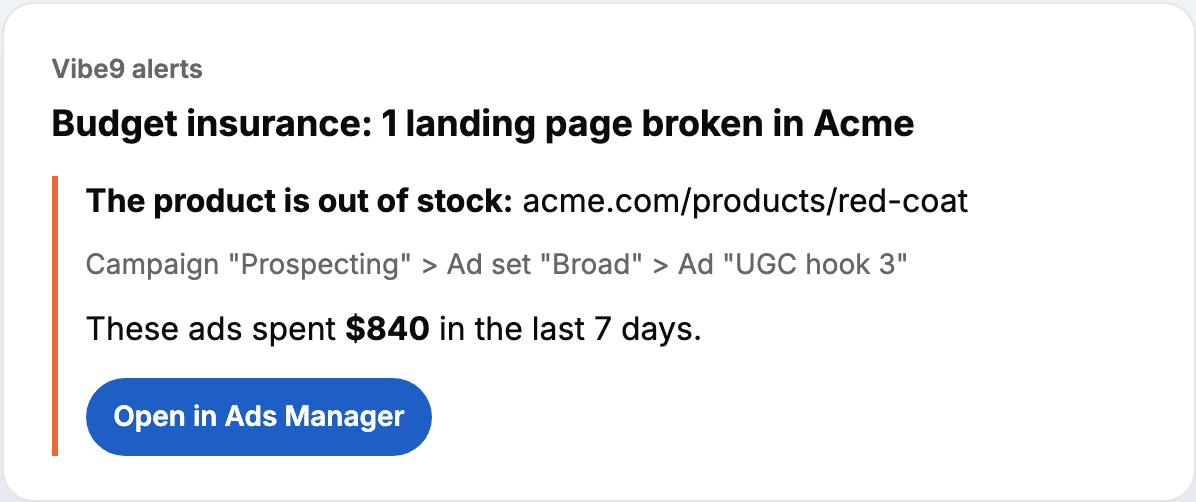
This check is the reason we built budget insurance into Vibe9. It is on for every dashboard:
- Every hour, Vibe9 opens the landing page of every active ad in the connected account, with the ad's URL parameters added.
- It flags pages that return an error or don't load, redirect loops, pages that say "not found", product or collection links that land on the home page, links that lose their
utm_parameters on the way, and Shopify products that were deleted or are sold out (from the same public.jsendpoint described above). - Each problem is checked twice before you get an alert, so a short blip doesn't wake you up.
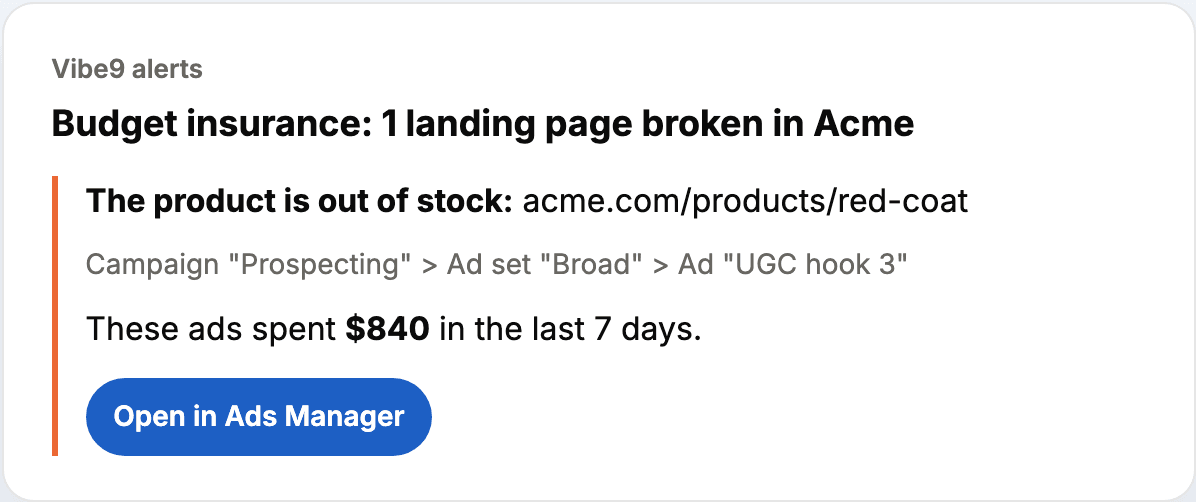
- The alert goes by email or Slack and names the campaign, ad set and ad, the broken address, and how much those ads spent in the last 7 days, with a link to open the ad in Ads Manager.
- Vibe9 has read-only access to Meta. It never pauses or changes your ads. You decide what to do.
FAQ
Do Facebook ads stop automatically when a product is out of stock? Only catalog ads, and only once the product is marked out of stock in your Meta catalog. Manual ads that link to a sold-out product page keep running, because the page still loads.
Will Meta reject my ad if the landing page is broken? It can. Meta's Advertising Standards say ads must not lead to non-functional landing pages, and an ad can be rejected or re-reviewed for it. But Meta also says its review may not catch every violation, so don't rely on it as monitoring.
How do I find which ads link to one specific product? List your active ads' links (from an export, if yours includes them, or ad by ad) and search for the product's URL handle. Remember carousel cards.
Why do I see sales in Shopify but no UTM source for my Meta ads? A common cause is a redirect between the ad's link and the final page that drops the query string. Open the ad's link in a private window and check whether the utm_ parameters are still there when the page finishes loading.
How often should I check landing pages? At least weekly if your stock changes, daily during launches and sales. An automated hourly check is the only way to catch a product that sells out mid-day.
Check your account
If you run more than a handful of ads that link to product pages, the hand check above is worth doing this week. If you'd rather not do it by hand every week, Vibe9 does it every hour. Request beta access.