GuidesMeasurement
Why does Meta report more purchases than Shopify? How to reconcile the two
Meta Ads Manager says 300 purchases, Shopify shows 210 orders. The six reasons the numbers differ, a 20-minute reconciliation method, and which number to trust.
On this page
Short answer Meta and Shopify count different things. Shopify counts orders that happened in your store, on the day they happened. Meta counts purchases it can connect to an ad: up to 7 days after a link click, and 1 day after someone only saw an ad (view-through). It reports them on the day of the ad impression, and it counts purchases from your existing customers as well as new ones. When Meta's number is much higher, the cause is usually view-through, purchases from people who'd have bought anyway, duplicate events, or other channels claiming the same orders. To reconcile, compare Meta's 7-day click purchases from new customers with Shopify's first-time customer orders for the same closed date range.
The six reasons the numbers differ
1. Meta counts purchases after views, not just clicks
Meta's standard attribution credits a purchase to an ad in three ways (Meta: about attribution models, as of November 2026):
- Click-through: within 1 or 7 days after a link click.
- View-through: within 1 day after someone saw the ad, without clicking.
- Engage-through: within 1 day after a non-link click, or after a 5-second video play.
When click, view and engage-through are all selected, Meta's Results column counts clicks and views but not engage-through; you can see engage-through purchases separately in Compare attribution settings (Meta: engage-through attribution).
A view-through purchase is someone who saw your ad and bought within a day. Many of them would have bought anyway: they already knew you, got your email, or searched your brand name. Shopify records that order once, and the email platform and Google may claim it too.
2. Meta counts existing customers too
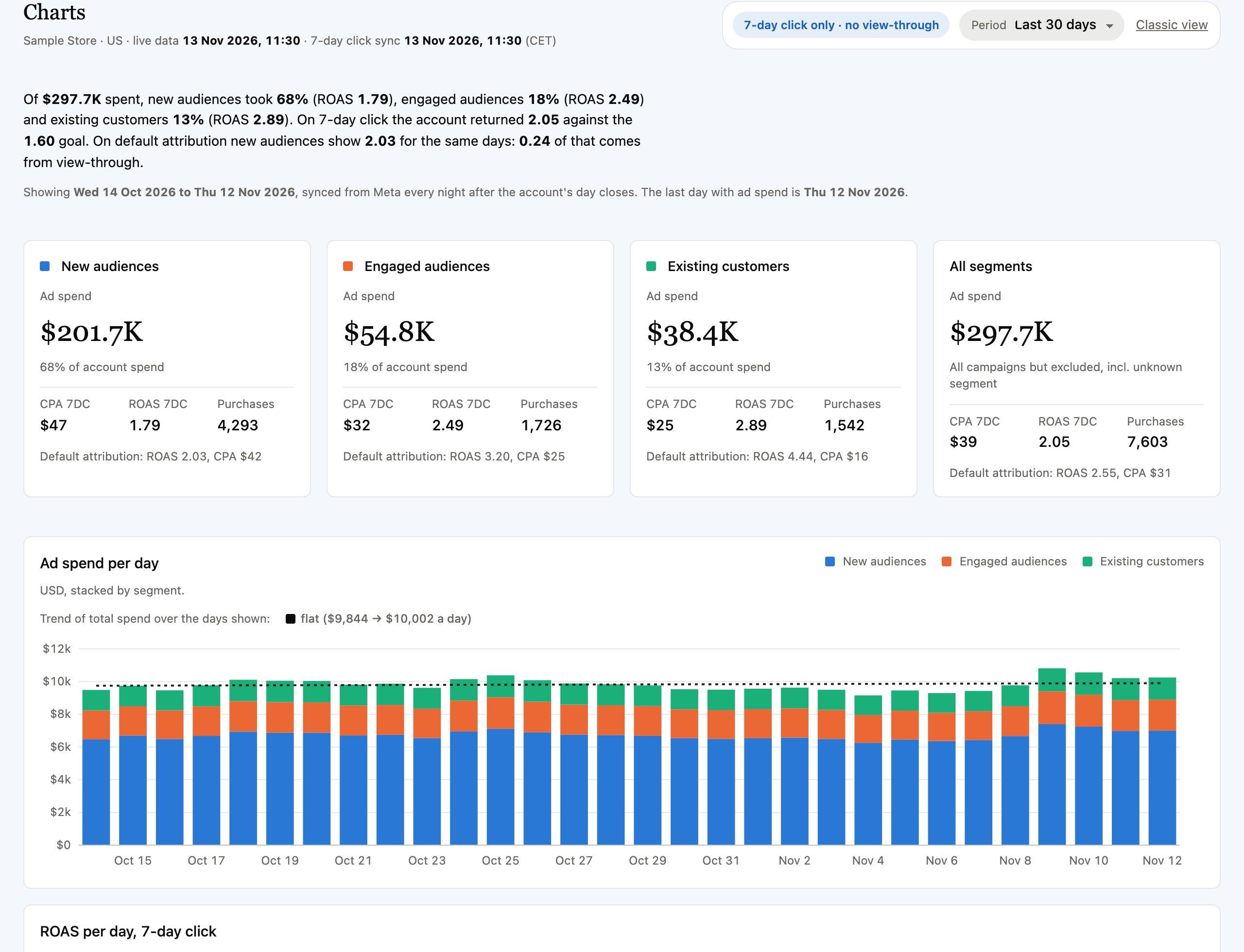
A returning customer who sees a retargeting ad and buys counts as a purchase in Meta. In Shopify it's a repeat order. If you judge Meta on total purchases, a big share can come from people who already buy from you (how to check that share). Meta's own audience segments breakdown shows this split (new audience, engaged audience, existing customers) for sales campaigns (Meta: audience segments reporting).
3. Different days
Ads Manager reports a conversion on the date of the ad impression, not the date of the purchase (Meta: how attribution works in Ads Manager). Shopify reports the order on the order date. A purchase on Tuesday after an ad seen on Saturday lands on different days. Over a single day this makes a big difference. Over a closed 30-day range it mostly evens out.
4. Duplicate purchase events
If you send purchases through both the Meta pixel and the Conversions API, Meta needs a matching event ID to know they're the same purchase (Meta: deduplicating pixel and server events). When deduplication breaks, a purchase can count twice. A sign of this: Meta shows more purchases in a day than Shopify has orders from all channels combined.
5. Test orders, cancellations and refunds
Shopify reports can exclude test orders and show refunds and cancellations. Meta keeps the purchase event that fired at checkout.
6. Modeled conversions
When Meta can't observe a conversion directly (for example because of browser or device privacy settings), it can estimate some of them. Those show up in Ads Manager but don't map to a specific Shopify order.
Why it matters
If you scale on Meta's default number, you can be scaling ads that mostly reach people who were going to buy anyway. Meta itself suggests judging new-customer campaigns on new-customer cost: "We recommend evaluating performance using your new customer metrics (new customer CPA) from your measurement tools, rather than overall campaign CPA alone" (Meta: customer lifecycle strategy).
How to reconcile Meta and Shopify in 20 minutes
Step 1: Pick a closed date range
Use the last full 30 days that ended at least 7 days ago. Recent days are still collecting 7-day click purchases, so they always look worse than they will.
Step 2: Split Meta's purchases by attribution
In Ads Manager, open Columns > Compare attribution settings (Meta: compare attribution settings). Add 7-day click and 1-day view next to your account's default (and 1-day engagement, if your account offers it, to see engage-through separately). Write down:
- Purchases on the default setting
- Purchases on 7-day click only
- The difference: that's what view-through adds
Step 3: Split Meta's purchases by customer type
Use Breakdown > By Demographics > Audience segments on your sales campaigns. You'll see spend and purchases for the new audience, engaged audience and existing customers. This only works if your engaged audience and existing customers are defined in Advertising settings (Meta: set up audience segments). Purchases are counted from the day the segments were saved.
Step 4: Get Shopify's new customers
In Shopify Analytics, find the number of first-time customers (or orders from new customers) for the same dates, plus total orders. Use the same time zone as your ad account.
Step 5: Compare like with like
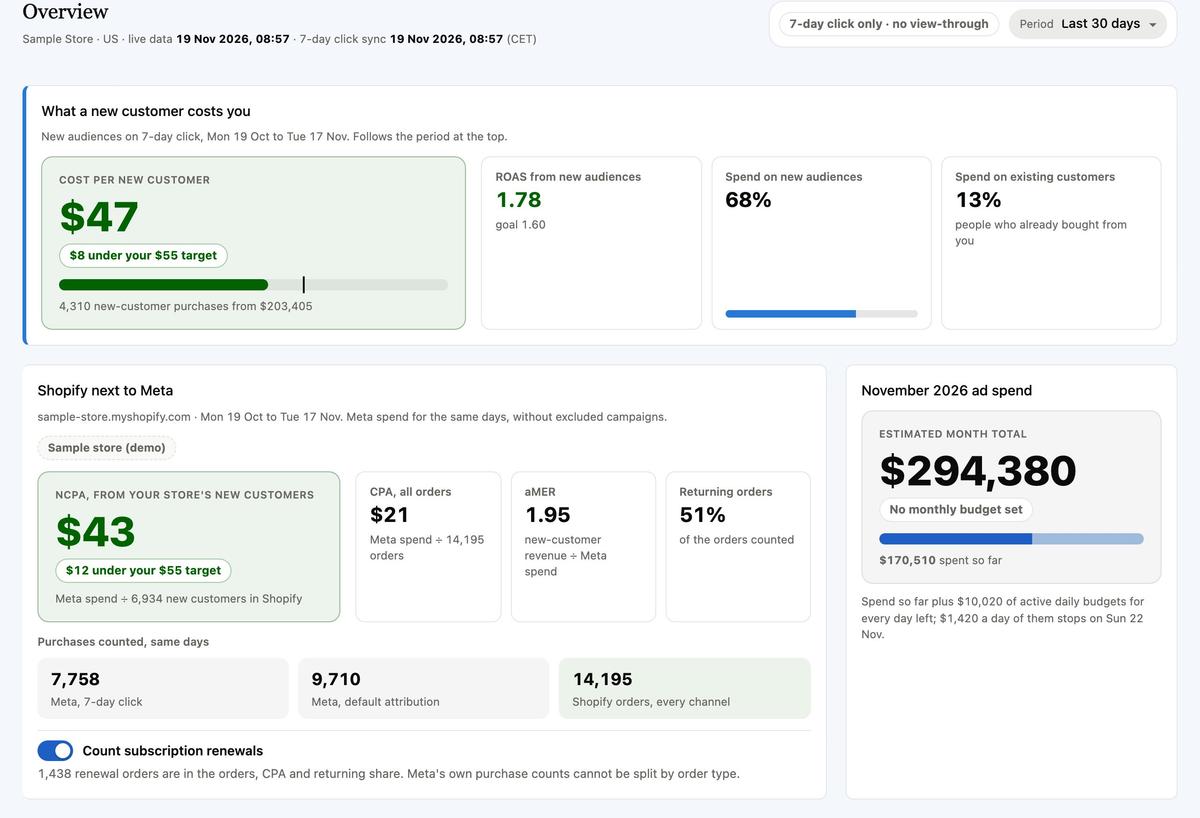
Put it in one table. The numbers below come from Vibe9's sample store (30 days). They're an illustration, not a benchmark:
| Meta (default attribution) | Meta (7-day click) | Meta (7-day click, new audience) | Shopify | |
|---|---|---|---|---|
| Purchases / orders | 9,710 | 7,758 | 4,310 | 14,195 all orders, 6,934 new customers |
What this example says:
- About 20% of Meta's default purchases come from view-through (9,710 vs 7,758).
- About 44% of Meta's 7-day click purchases come from people who weren't new (7,758 vs 4,310).
- Shopify had 6,934 new customers from all channels. Meta's 4,310 new-audience click purchases would be 62% of them. Whether that's plausible depends on your other channels.
Step 6: Check for duplicates
If Meta's purchases on any single day are higher than Shopify's total orders that day, look in Events Manager for deduplication warnings on your Purchase event before you trust any of the numbers.
Which number should you use?
For decisions about acquiring customers, use cost per new customer on 7-day click: spend reaching new audiences divided by the purchases from new audiences you can tie to a click. (how to calculate it step by step). Then check it against Shopify's first-time customers, so you know the Meta number isn't drifting away from reality. Keep the default attribution number for comparing ads with each other inside Meta, not for deciding whether Meta is profitable.
Common mistakes
- Comparing yesterday's Meta number with yesterday's Shopify number. Use closed ranges.
- Adding up every platform's claimed purchases. Meta, Google and your email tool will each claim some of the same orders. The total will always be more than Shopify.
- Fixing the pixel when the issue is attribution. A healthy pixel with 1-day view still reports more than Shopify. That's not a tracking bug.
- Excluding view-through entirely without testing. Some view-through purchases are real. If you need to know how many, run a lift test rather than guessing.
How Vibe9 helps
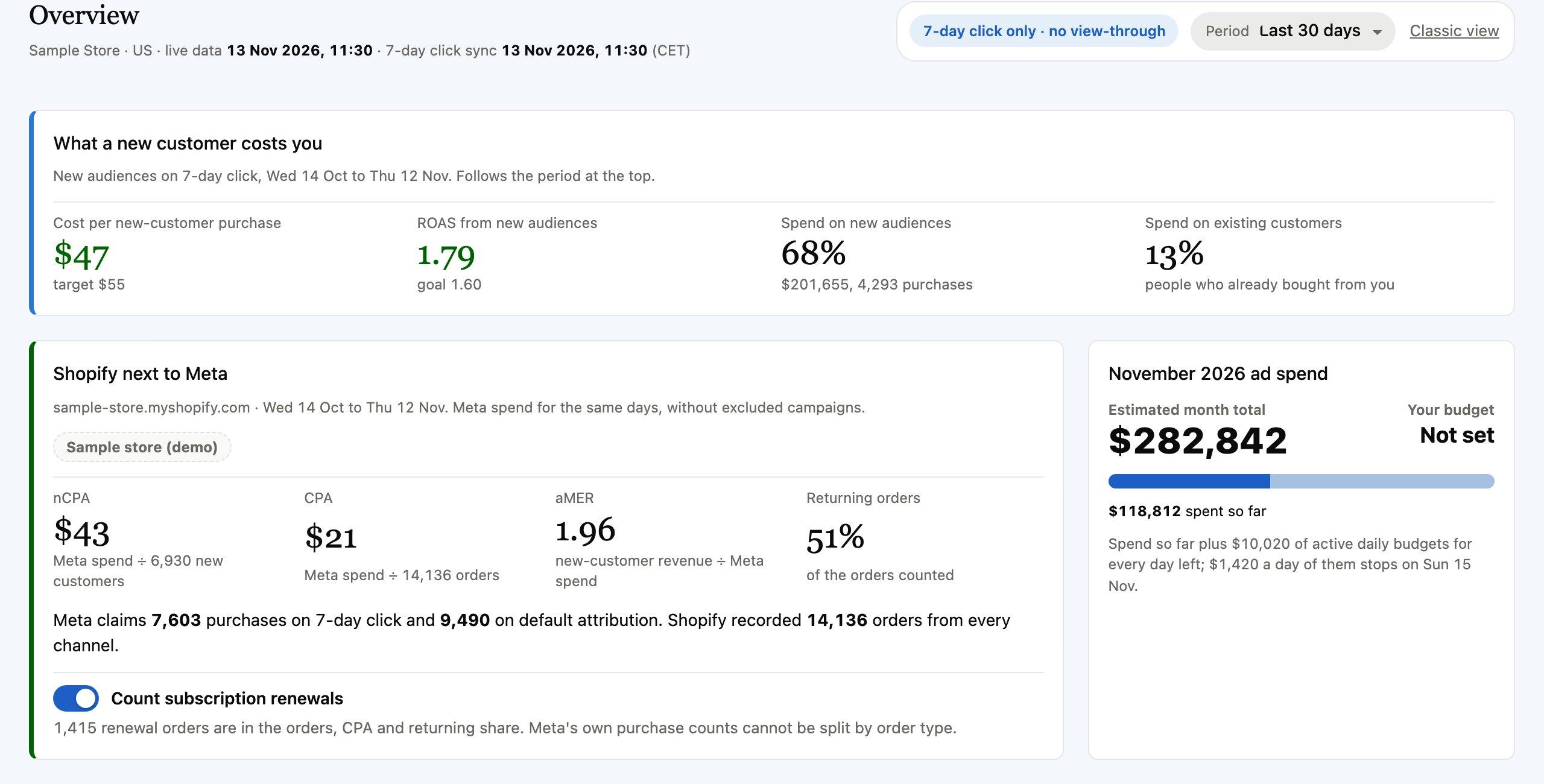
Vibe9 puts this reconciliation on one screen and keeps it current:
- What Meta claims next to Shopify: purchases Meta reports on its default attribution, next to new customers in Shopify, checked against real Shopify orders.
- Cost per new customer and ROAS on 7-day click, with no view-through, using Meta's audience segments.
- Customer types: spend, CPA and ROAS for new, engaged and existing customers, and how much of Meta's ROAS is only view-through.
- Closed days only, so a half-collected day never skews the read.
- How we measure: every formula on one page, so you can check how each number is built.
Vibe9 has read-only access to Meta and never changes your ads.
FAQ
Why does Facebook show purchases but Shopify shows no orders? Check three things in this order: deduplication of pixel and Conversions API events, test purchases fired from your own checkout, and whether the purchase is attributed to an earlier date than the order. If Meta shows purchases on days with zero Shopify orders, it's a tracking problem, not attribution.
Is Meta over-reporting on purpose? No. It counts purchases by its own rules (attribution windows, impression date, existing customers). The numbers aren't wrong, they answer a different question from Shopify's.
Which attribution setting matches Shopify best? None matches exactly, because Shopify doesn't know which orders came from ads. 7-day click without view-through is the closest to "people who clicked an ad and bought", which is why it's a good basis for cost per new customer.
Should I switch my campaigns to 7-day click? The attribution setting on an ad set also affects how Meta optimizes delivery. Changing it is a separate decision from how you report. You can report on 7-day click with Compare attribution settings without changing how campaigns optimize.
How much higher than Shopify is normal for Meta? There's no reliable universal number. It depends on how much of your spend reaches existing customers, how much video you run and how many other channels you use. Measure your own ratio monthly and watch for changes.
See Meta's claim next to Shopify
You can do the reconciliation above by hand once a month. If you'd rather see it every day, with cost per new customer on 7-day click next to Shopify's real new customers, request beta access.