GuidesMeasurement
How much of your Meta ROAS is view-through? How to measure it
Meta counts purchases from people who only saw an ad. How to see what share of your ROAS that is, per campaign and per customer type, and what to do with the number.
On this page
Short answer Put two numbers next to each other for the same closed period: ROAS on your account's default attribution, and ROAS on 7-day click only. The gap, divided by the default number, is the share of your reported ROAS that comes from people who didn't click. You get both from Columns > Compare attribution settings in Ads Manager. Do it per campaign and per customer type, because the share is not the same everywhere: it's usually small on ads that reach new people and large on ads that reach people who already buy from you.
What Meta counts when nobody clicks
Meta's standard attribution credits a purchase to an ad in three ways (Meta: about attribution models, as of November 2026):
- Click-through: the person clicked a link in the ad and bought within 1 or 7 days.
- View-through: the person saw the ad, didn't click, and bought within 1 day.
- Engage-through: the person interacted without clicking a link, or played a video for 5 seconds, and bought within 1 day.
When all three are selected, the Results column counts click-through and view-through; engage-through is shown separately in Compare attribution settings (Meta: engage-through attribution).
A view-through purchase is real: someone bought. The open question is whether the ad caused it. A person who gets your email, opens Instagram, scrolls past your ad and then buys from the email counts as a view-through purchase.
Why the share differs so much by audience
Think about who sees an ad a day before buying without clicking it:
- Existing customers buy from you anyway, from email, SMS or habit. Your ads follow them around. A large part of their "view-through" purchases would have happened without the ad.
- New people have no other reason to buy from you tomorrow. When they buy after only seeing an ad, the ad more likely had something to do with it, and there are fewer such purchases to begin with.
So an account that spends a lot on warm audiences reports a much higher view-through share than one that spends mostly on new people, and its headline ROAS flatters it more.
How to measure it
Step 1: Pick a closed period
Use the last full 30 days that ended at least 7 days ago, so 7-day click purchases have finished coming in.
Step 2: Add the comparison columns
In Ads Manager: Columns > Compare attribution settings (Meta: compare attribution settings). Tick 7-day click and 1-day view. You now see purchases and purchase value on each setting next to your default.
Step 3: Calculate the share
View-through share of ROAS = (ROAS on default attribution − ROAS on 7-day click) ÷ ROAS on default attribution
Do the same for purchases to get the share of purchases.
Step 4: Break it down by customer type
Use Breakdown > By Demographics > Audience segments on your sales campaigns to see the same columns for the new audience, the engaged audience and existing customers (Meta: audience segments reporting). The segments have to be defined in Advertising settings first.
Here is an example over 30 days. It's an illustration, not a benchmark:
| Customer type | ROAS, default | ROAS, 7-day click | Share that isn't click |
|---|---|---|---|
| New audience | 2.02 | 1.78 | 12% |
| Engaged audience | 3.30 | 2.58 | 22% |
| Existing customers | 4.58 | 2.97 | 35% |
| Whole account | 2.58 | 2.07 | 20% |
Read it this way: the account reports 2.58, and a fifth of that comes from people who didn't click. On existing customers it's more than a third. On new people, where the ads do their real job, the click-only ROAS is 1.78.
What to do with the number
- Report on 7-day click. Use it for targets, scaling decisions and comparing months. It's the closest Meta gets to "clicked an ad and bought".
- Don't delete view-through from your thinking. Some of those purchases were caused by the ad, especially on video and on new audiences. You just can't tell how many from attribution alone.
- Watch the share over time. If it climbs while 7-day click ROAS falls, the account is drifting toward people who'd buy anyway. Check how much spend goes to existing customers.
- Settle disputes with a test. If the difference matters for a budget decision, run a conversion lift or a geo holdout test. That measures what the ads caused, which no attribution setting does.
- Keep reporting and optimization apart. The attribution setting on an ad set also steers delivery. You can report on 7-day click through Compare attribution settings without changing how your ad sets optimize.
Common mistakes
- Comparing the last 7 days. Click purchases are still arriving, so the click-only number looks too low and the share too high.
- One number for the whole account. The share on prospecting and on retargeting can differ by a factor of three.
- Treating the gap as "fake". It's unproven, not fake.
- Mixing settings between reports. Pick one for decisions and say which one on every report, so nobody compares a 7-day click month with a default-attribution month.
How Vibe9 helps
- 7-day click only, everywhere. Every number in Vibe9 is on 7-day click with no view-through, so targets and months are comparable.
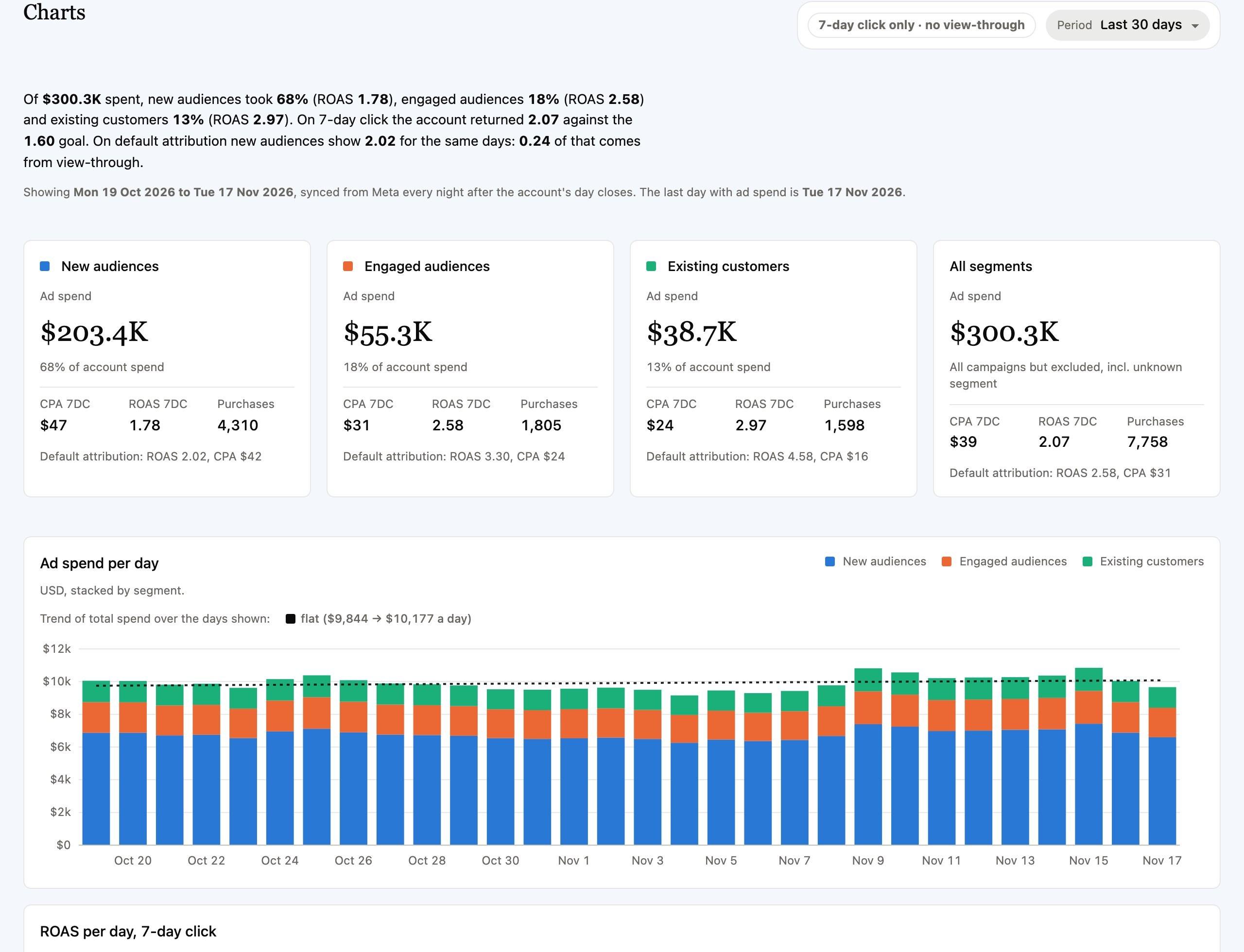
- Customer types: spend, CPA and ROAS for new, engaged and existing customers, with Meta's default-attribution ROAS and CPA under each, so the view-through share is visible per group.
- A plain sentence on top: how much of the default ROAS for new audiences comes from view-through in the period you picked.
- Cost per new customer against your target, next to what Shopify recorded (why the two differ).
Vibe9 has read-only access to Meta and never changes your attribution settings or your ads.
FAQ
Should I count view-through conversions? Count them as a second, softer number. Make decisions on 7-day click, and use a lift test when you need to know how much view-through is real.
What's the difference between 7-day click and 1-day view? 7-day click credits a purchase within 7 days of a link click. 1-day view credits a purchase within a day of an impression with no click. They answer different questions: who clicked and bought, and who saw and bought.
What is engage-through? A purchase within a day of an interaction that isn't a link click, or of a 5-second video play. Meta reports it separately from the Results column when click, view and engagement are all selected.
Is a high view-through share bad? Not by itself. It tells you where your ads are reaching people who were close to buying anyway. On existing customers a high share is normal; on prospecting it deserves a look.
Can I turn view-through off? You can choose an attribution setting without 1-day view on an ad set, which also changes what Meta optimizes for. Test that on part of the budget before you change everything.
See it every day
You can pull this comparison by hand once a month. If you'd rather see ROAS on 7-day click next to Meta's default for every customer type every morning, request beta access.