HelpAds
Creative calculator: how many new ads to make next month
Where to find it Ads, then Creative calculator (the fifth tile)
Short answer The Creative calculator works out how many new ads to make next month so your account keeps enough winners. It starts from the spend new winners need to carry, divides by what one winner spends, then by your own test rate and win rate from the last 60 days. Change any number to plan a bigger month or a peak season.
Where to find it
Open Ads in the top bar, then click Creative calculator ("How many new ads to make next month").
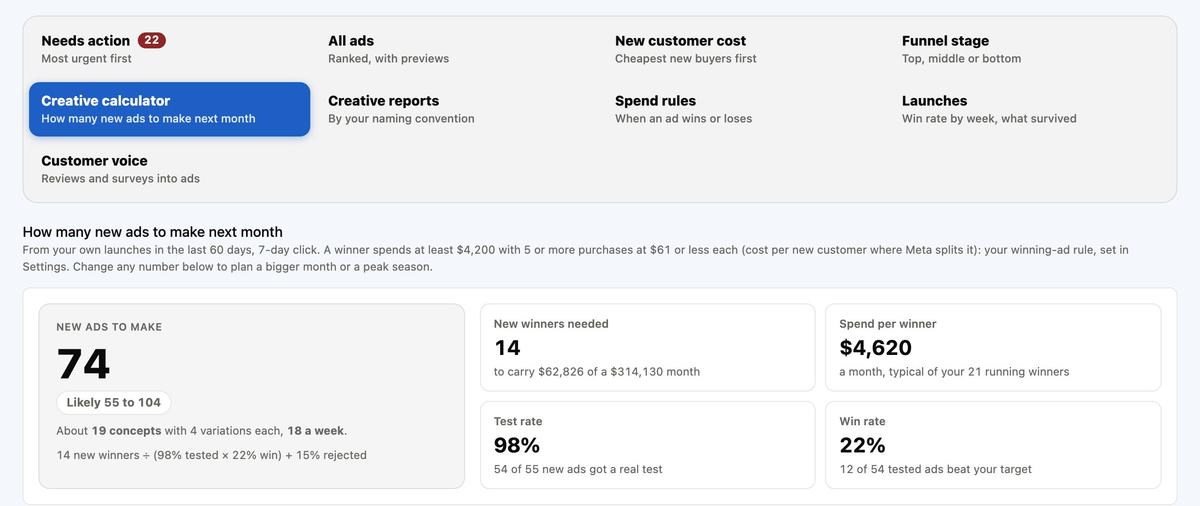
Everything comes from your own ads in the last 60 days up to yesterday, on 7-day click, without excluded campaigns. Each Meta ad counts on its own.
The big number
- New ads to make: how many new ads to launch next month.
- Likely ... to ...: the range around it. When the test rate and win rate are both your account's own, it's an 80% range around your measured hit rate. Otherwise it's about 70% to 140% of the number.
- The sum under it: new winners ÷ (test rate × win rate), plus a margin for ads that are rejected or stopped (15% unless you change it). Above it, the same number as concepts (4 variations each unless you change it) and per week.
Next to it:
- New winners needed: the spend new winners must carry ÷ spend per winner, rounded up.
- Spend per winner: what your typical running winner spends a month (the median).
- Test rate: the share of new ads that got a real test, meaning they spent at least the Tested from amount.
- Win rate: the share of tested ads that became winners.
What counts as a winner
A winner is an ad that reached scaling spend at or near your target cost per purchase, so it carries budget, not just a few lucky sales. Vibe9.co uses one rule for the Creative calculator, Creative reports, Spend rules and Launches:
- Tested: it has spent at least the Tested from amount.
- Winner: it's tested, it has spent at least the Scaling spend, it has at least the Minimum purchases, and each purchase cost no more than your target CPA plus the Over target allowed percentage.
Set each part in Settings, under Winning ad. Leave a field blank to use Auto:
- Tested from: where the account's Spend rules say an ad can be judged, once they're learned with confidence. Until then, two times your target CPA.
- Scaling spend: the lowest winner level the Spend rules learned from your account's ads that held target. Until then, ten times your target CPA. It's never lower than Tested from.
- Over target allowed: 10%.
- Minimum purchases: 5.
Preview the count in that card shows how many creatives would win under the rule before you save.
How the calculator applies it: it judges each ad on what it spent and its 7-day click purchases from launch to yesterday, within the last 60 days. The cost it checks against the rule is the cost per new customer when Meta's new audience split gave the ad 3 or more new-customer purchases in the last 30 days. Otherwise it's the cost per 7-day click purchase. The calculator is the only view that uses the new-customer cost. The rates only count ads launched long enough ago to judge (21 days until the account has enough winners to learn its own timing). Ads that were already spending on the first of the 60 days aren't counted as launches.
With fewer than 15 launches to judge or fewer than 2 winners, the calculator uses example rates (28% tested, 15% win) and says so.
Why that many winners

The spend new winners must carry is the larger of two amounts:
- The gap: the share of your monthly spend your running winners carry today, minus what the ones that aren't wearing out will keep carrying. Winners flagged as wearing out in Needs action aren't counted on.
- The minimum: a share of the budget for new winners every month (20% by default), because today's winners fade even when they look fine.
Plan a month
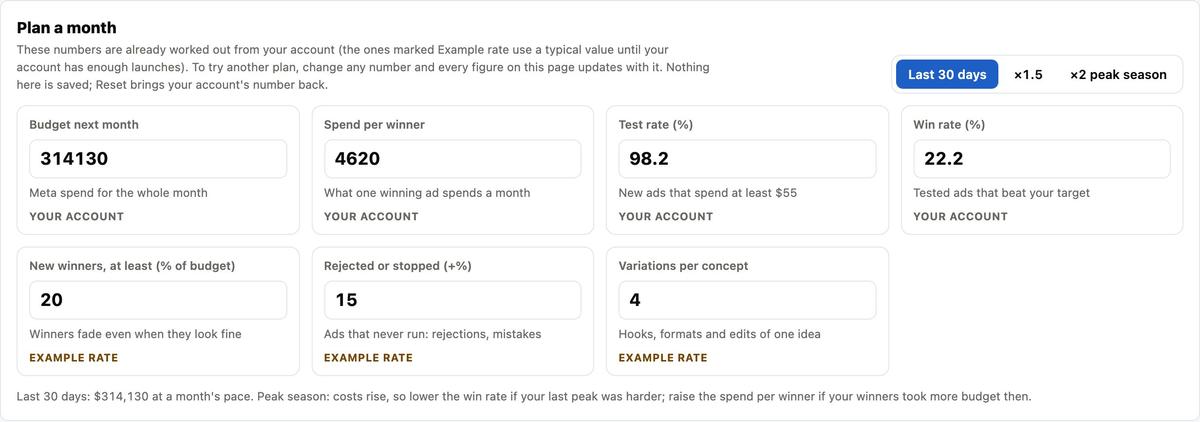
The inputs are Budget next month, Spend per winner, Test rate, Win rate, New winners, at least (% of budget), Rejected or stopped and Variations per concept. Each is marked Your account, Example rate or Your number. Change any of them and the page updates. Nothing is saved, and Reset brings your account's number back.
- Last 30 days, ×1.5, ×2 peak season: set the budget to your last 30 days at a month's pace, or one and a half or two times that. If you've set a Monthly Meta ad budget in Settings, the first button says Your budget, and ×1.5 and ×2 multiply that budget instead.
Which ads to make

This splits the new ads by one field of your naming convention (Angle by default, change it in Split by). 80% go to up to six values that produced winners in the last 90 days, more to those that won more often across more tests. 20% are kept for new ideas. Values with no winner yet, tested fewer than 3 times or marked Make less in Creative reports stay in the new ideas share. It needs your naming convention set up in Creative reports, and it isn't on client share links.
Winners carrying spend now, and this month so far
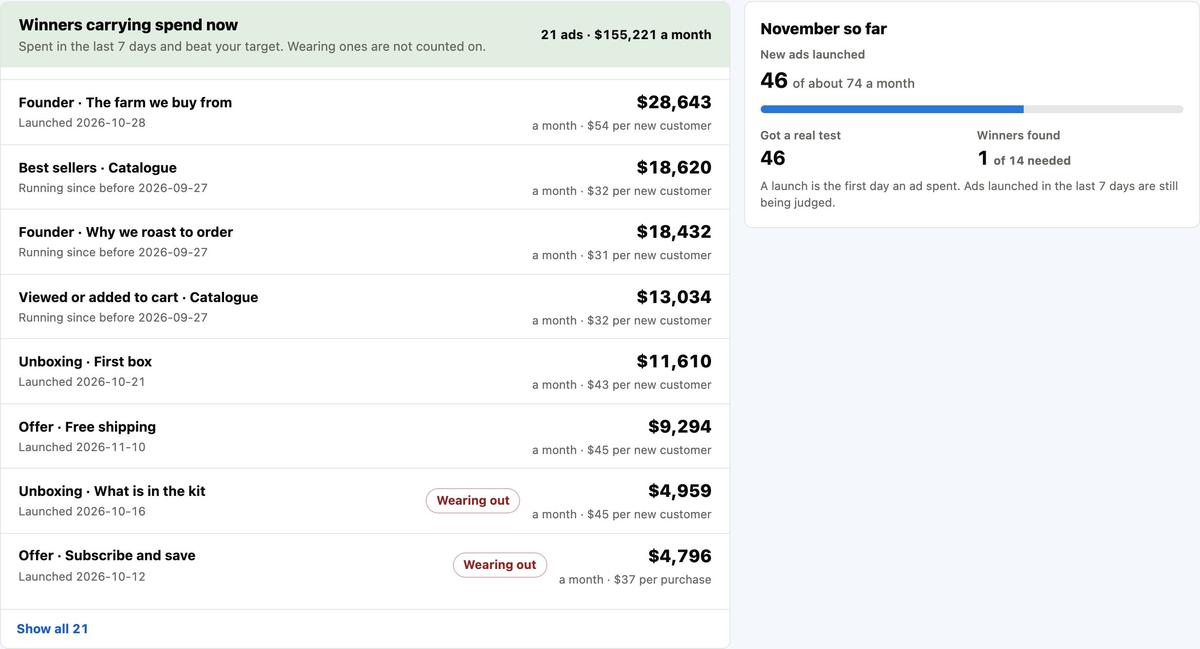
- Winners carrying spend now: winners that spent in the last 7 days, with what each spends a month. Wearing ones are marked. Click one to open its detail panel, as in All ads.
- ... so far: new ads launched this calendar month against the number you need, how many got a real test and the winners found.
A monthly routine
- Before you write next month's briefs, open Creative calculator. For a peak season, click ×2 peak season or type your budget.
- Brief the number as concepts with variations, split the way Which ads to make suggests.
Good to know
- The calculator changes nothing in your ad account.
- How every number is counted: open How we measure in the app's top bar.