HelpAds
Spend rules: when to judge an ad, and what a winner is on your account
Where to find it Ads, then Spend rules (signed-in team members only)
Short answer Spend rules learns from up to 12 months of your own ads: the spend at which to judge an ad and the cost per purchase that should turn it off, the spend your winners reach, and the early numbers that told winners apart. It also shows what went to ads past that kill point in the last 30 days.
Where to find it
Open Ads in the top bar, then click Spend rules ("When an ad wins or loses"). It's for signed-in team members only: client share links don't show it.
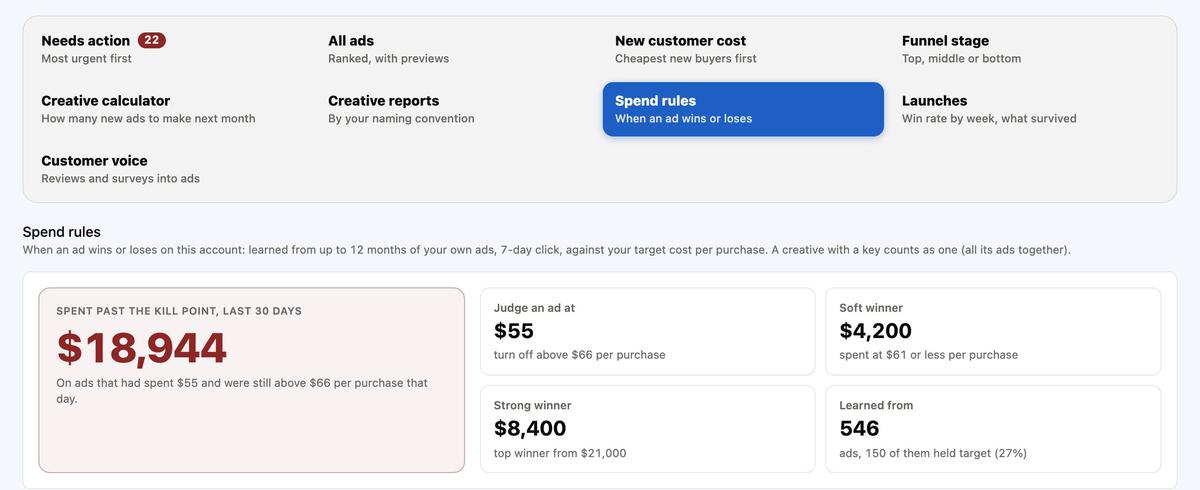
Everything here uses 7-day click and your target cost per purchase from Settings. A creative with a key in your naming convention counts as one, all its ads together. Excluded campaigns are left out.
The numbers at the top
- Spent past the kill point, last 30 days: spend on ads that had reached the judge spend while still costing more per purchase than the kill line.
- Judge an ad at: the spend to judge an ad at, and the cost per purchase that turns it off.
- Soft winner and Strong winner: what your winners spend, at your target plus 10% or less per purchase. The top winner level is under Strong winner.
- Learned from: how many ads the rules learned from, and how many of them held target and reached the soft winner level.
The rules
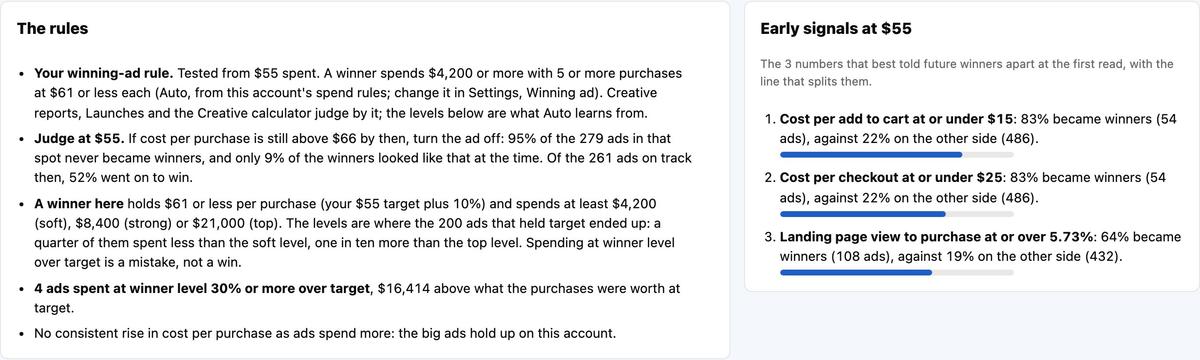
The kill rule. Vibe9.co tries spend levels from one target cost per purchase up, and lines from 1.2 to 3 times your target. It picks the earliest spend and tightest line where at least 9 in 10 of the ads above the line (15 or more) never won, and no more than 1 in 10 future winners looked like that. If no line passes, it shows the best one with a warning.
What a winner is here. An ad that held your target plus 10% per purchase and reached the soft level. The levels come from the ads that held target with 5 or more purchases: a quarter spent less than the soft level, one in ten more than the top level. The soft level is never below ten target CPAs. With fewer than 8 such ads, the levels are 20, 50 and 150 times your target.
Mistakes. Ads that spent at winner level 30% or more over target, and how much more that cost than the purchases were worth at your target.
Where cost starts to rise. For ads that reached the soft level, Vibe9.co compares cost per purchase at higher spend with each ad's own early cost. If the typical ad gets 25% more expensive past a spend level, you'll see it.
Early signals
The three numbers that best told future winners apart at the first read, with the line that splits them and how many ads on each side became winners. The first read is at about half the judge spend, never below one target cost per purchase. Candidates include cost per add to cart, link CTR, CPM and hook rate. A signal needs 30 ads and 5 winners at that spend.
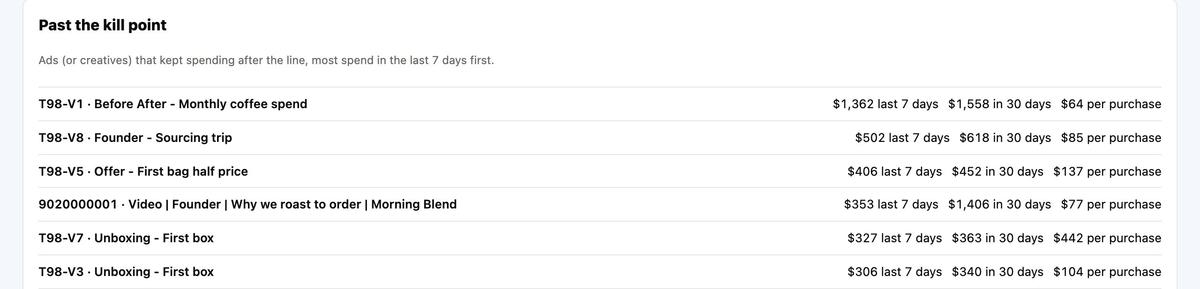
Past the kill point
Up to 20 ads (or creatives) that kept spending after the line in the last 30 days, most spend in the last 7 days first. "stopped" means nothing spent past the line in the last 7 days. The cost per purchase covers everything it spent.
What counts as a winner
A winner is an ad that reached scaling spend at or near your target cost per purchase, so it carries budget, not just a few lucky sales. Vibe9.co uses one rule for the Creative calculator, Creative reports, Spend rules and Launches:
- Tested: it has spent at least the Tested from amount.
- Winner: it's tested, it has spent at least the Scaling spend, it has at least the Minimum purchases, and each purchase cost no more than your target CPA plus the Over target allowed percentage.
Set each part in Settings, under Winning ad. Leave a field blank to use Auto:
- Tested from: where the account's Spend rules say an ad can be judged, once they're learned with confidence. Until then, two times your target CPA.
- Scaling spend: the lowest winner level the Spend rules learned from your account's ads that held target. Until then, ten times your target CPA. It's never lower than Tested from.
- Over target allowed: 10%.
- Minimum purchases: 5.
Preview the count in that card shows how many creatives would win under the rule before you save.
The first line under The rules shows your rule as it stands. Auto takes the Judge an ad at spend and the Soft winner level once the kill rule passes all its tests.
A weekly routine
- Turn off the ads under Past the kill point that still spend.
- Check new ads at the Judge an ad at spend. Turn off the ones above the line.
- Find the rest of this week's changes in Needs action.
Good to know
- The rules need 60 days of per-ad history and a target cost per purchase. Team members who can edit can click Read 12 months from Meta once. The daily sync keeps it current.
- The rules learn only from ads launched at least 14 days before the last day, and leave out ads already running on the first stored day.
- Vibe9.co doesn't change anything in your ad account. You make the change in Ads Manager.