HelpAds
New customer cost: which ads bring in new customers, and at what cost
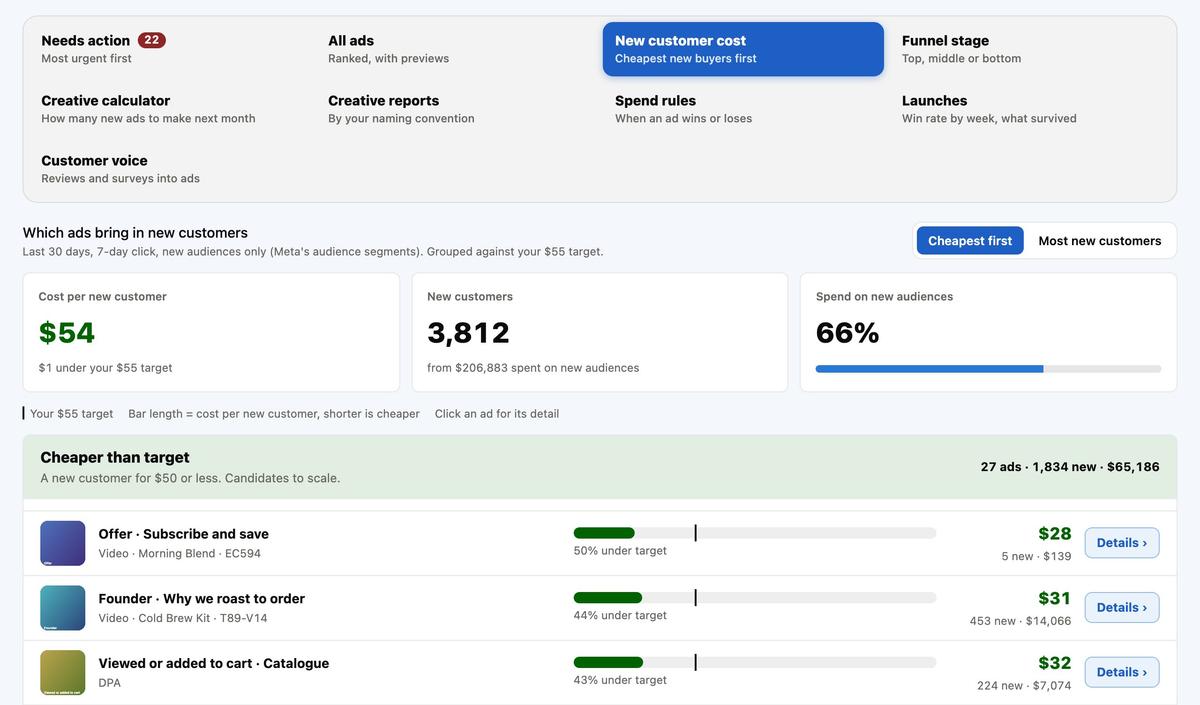
Where to find it Ads, then New customer cost (the third tile)
Short answer New customer cost ranks your ads by what a new customer costs, counting only the spend and 7-day click purchases from new audiences. Ads are grouped against your target CPA: Cheaper than target, Around target, Too expensive for new customers and Too early to judge. Click any ad for its detail.
Where to find it
Open Ads in the top bar, then click New customer cost (the third tile, "Cheapest new buyers first").
Where "new" comes from
Meta splits each ad's spend and purchases into audience segments: new audience, engaged audience and existing customers. This view keeps only the new audience part, on 7-day click. Spend and sales from people who already know you don't count here.
- The window follows the Period you picked in All ads or Needs action: the last 7 or 14 days, otherwise the last 30 days. The line under the title says which.
- Meta only splits spend from the day the segments were saved in your ad account. Earlier spend is left out.
- No segments yet? The page says so. Set up "Existing customers" and "Engaged audience" in Ads Manager, under Advertising settings, Audience segments.
- Excluded campaigns are left out.
The three totals
- Cost per new customer: all spend on new audiences divided by all new customers. Green when it's at or under your target CPA, red when it's over, with the difference in money underneath.
- New customers: how many 7-day click purchases came from new audiences, and what you spent on new audiences to get them.
- Spend on new audiences: the share of these ads' spend that went to new audiences.
The four groups
Every ad with spend on new audiences sits in one group. The thresholds come from your target CPA.
| Group | The rule | What to do |
|---|---|---|
| Cheaper than target | A new customer costs 90% of your target or less, with 5 or more new customers. | Candidates to scale. |
| Around target | Over 90% of your target, up to 120% of it, with 5 or more new customers. | Keep and watch. |
| Too expensive for new customers | Over 120% of your target, or two target CPAs spent on new audiences with no new customer. | Refresh the creative or move the budget. |
| Too early to judge | Fewer than 5 new customers, or none yet with less than two target CPAs spent on new audiences. | Wait. It's left out of the ranking so a lucky ad doesn't top the list. |

The line on each group's header adds it up: how many ads, how many new customers and the spend on new audiences.
Each row
- The ad: its short name, then its format, product and code (or its campaign). Each row is one Meta ad.
- The bar: its cost per new customer. Shorter is cheaper. The tick is your target. Underneath, how far it is under or over your target in percent.
- The cost per new customer, coloured against your target, then its new customers and its spend on new audiences.
- Details opens the ad's panel: who it reaches, its cost per sale week by week and what to do with it. See All ads for the panel.
Each group shows 8 ads. Show all opens the rest.

Sorting
The switch at the top right sorts the ads inside each group:
- Cheapest first: lowest cost per new customer first. Ties go to the ad with more new customers.
- Most new customers: most new customers first. Ties go to the cheaper ad.
What to do with it
- Check the Cost per new customer total against your target.
- Look at Cheaper than target with Most new customers: those ads bring volume cheaply. Give them budget step by step.
- Take budget from Too expensive for new customers, or brief a new creative for them.
- Leave Too early to judge alone until it has 5 new customers.
- An ad with a good ROAS in All ads but a high cost here may be selling mostly to people who already know you. Check Funnel stage.
Good to know
- Your target CPA lives in Settings, under Targets. Change it and the groups follow.
- This view uses 7-day click only, never view-through, so its numbers won't match the Meta-reported numbers in All ads.
- Needs action works out cost per new customer the same way, from Meta's new-audience segments on 7-day click.
- Vibe9.co doesn't change anything in your ad account. You make the change in Ads Manager.