HelpAds
Funnel stage: where each ad really works, top, middle or bottom
Where to find it Ads, then Funnel stage (the fourth tile)
Short answer Funnel stage sorts your ads into Top of funnel, Middle of funnel and Bottom of funnel from who each ad actually reaches, not from what the campaign is called. It uses Meta's audience segments on 7-day click. A warning at the top lists ads set up for new customers that mostly reach people who already know you.
Where to find it
Open Ads in the top bar, then click Funnel stage (the fourth tile, "Top, middle or bottom").
How an ad gets its stage
Meta splits each ad's spend into three audience segments: new people, engaged people (they visited, watched or followed) and existing customers. Vibe9.co looks at the share of each ad's spend that went to each one:
| Stage | The rule | Judged on |
|---|---|---|
| Top of funnel | 70% or more of its spend reaches new people. | Cost per new customer |
| Middle of funnel | In between. | Cost per new customer |
| Bottom of funnel | Half or more of its spend reaches engaged people and existing customers together. | Sales from warm people, not new customers |
- The numbers are on 7-day click, for the Period you picked in All ads or Needs action: the last 7 or 14 days, otherwise the last 30 days. The line under the title says which.
- Spend from before the segments were saved in your ad account isn't split by Meta, so it's left out of the shares.
- Each Meta ad is judged on its own.
- Ads under the Min spend from All ads (250 in your account's currency unless you changed it) are left out, and so are excluded campaigns.
No segments? The page says so. Set up "Existing customers" and "Engaged audience" in Ads Manager, under Advertising settings, Audience segments. They count from the day they're saved.
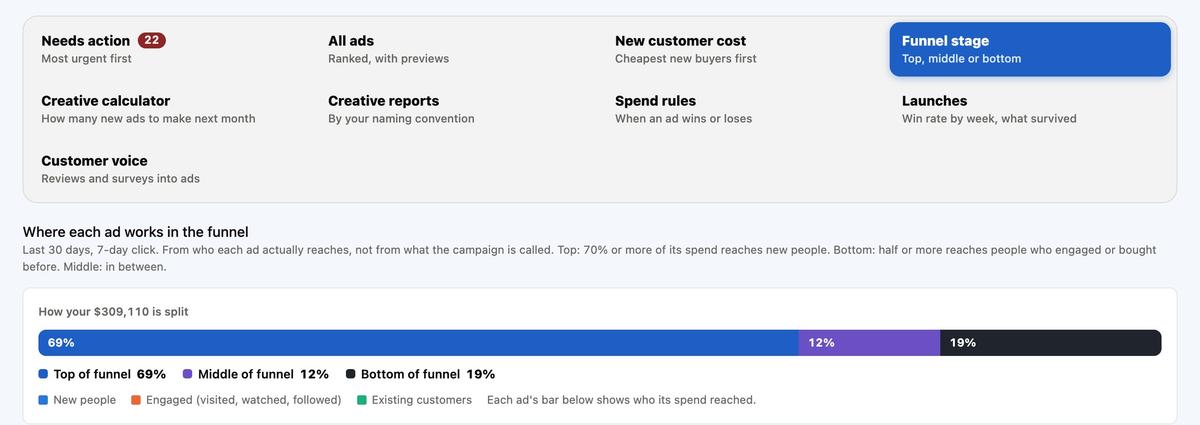
How your spend is split
The bar at the top shows the share of spend in each stage, with the total above it. The key under it names the stages and the colours used for new people, engaged people and existing customers.
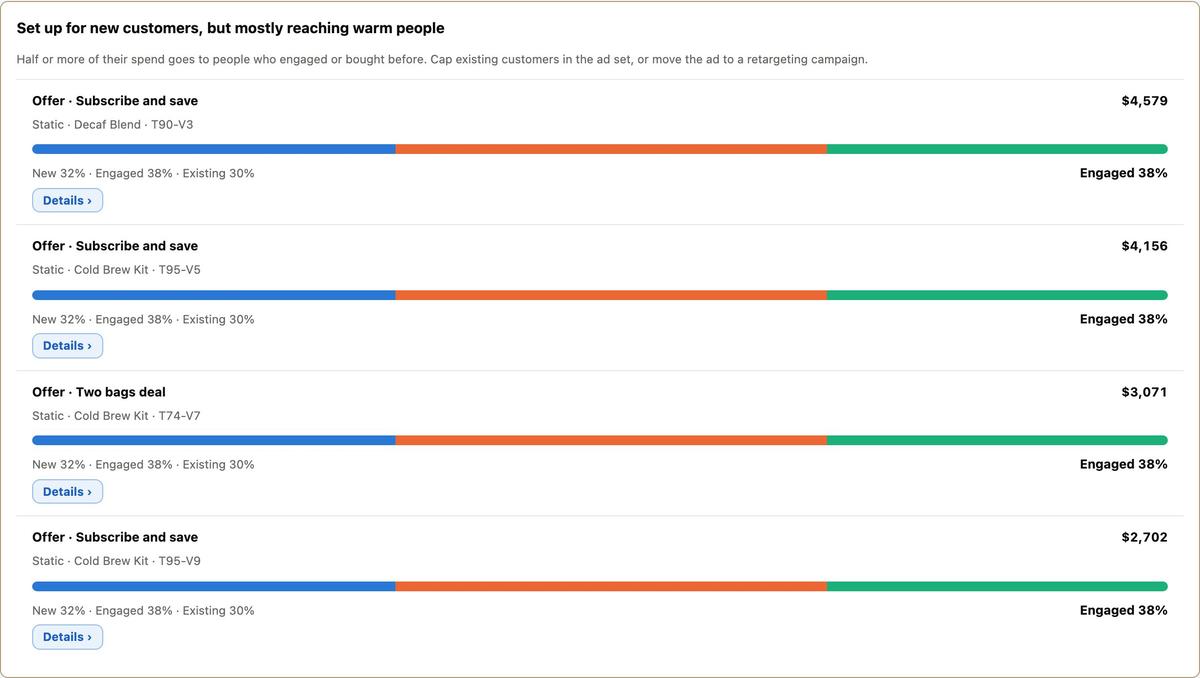
Set up for new customers, but mostly reaching warm people
This warning lists ads that were set up for new customers but now spend half or more on engaged people and existing customers. A typical case is an Advantage+ shopping ad with a good ROAS that mostly reaches existing customers.
What an ad was set up for comes from the audience rules in Settings, or failing that from words in its campaign and ad set names. "New", "prospecting", "broad", "cold", "ASC", "Advantage shopping" or "TOF" mean new customers. "Existing", "retargeting", "remarketing", "warm", "DPA", "catalogue", "cart" or "engaged" mean warm people, and they win if a name has both.
What to do: cap existing customers in the ad set, or move the ad to a retargeting campaign. When no ad is in this state, the page says No mismatch.
A similar check, by campaign and ad set names, drives the Named new, works warm saved view in Needs action.
The three columns
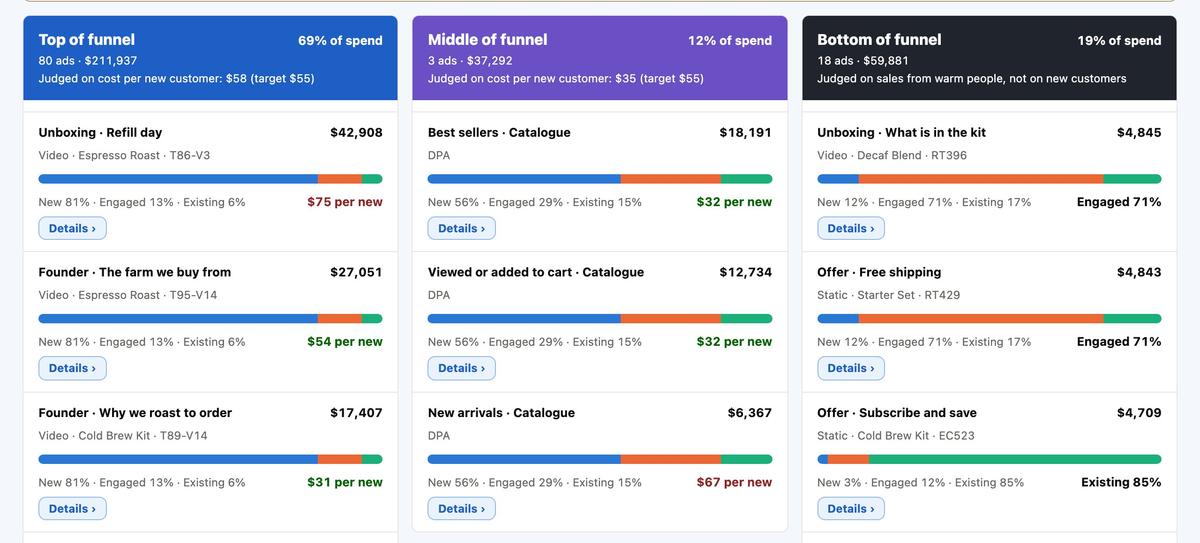
Each column's header shows its share of spend, how many ads and how much they spent, and what the stage is judged on: cost per new customer against your target for top and middle, sales from warm people for the bottom.
Each card is one ad, biggest spend first:
- Its name, spend, and format, product and code.
- A bar of who its spend reached: new (blue), engaged (orange) and existing (green), with the percentages under it.
- On the right: for top and middle, what a new customer costs, green at or under your target CPA and red over it, or "No new customer yet". For the bottom, its biggest warm share.
Each column shows 6 ads. Show all opens the rest. Click a card for the ad's detail panel.
What to do with it
- Check the split: how much of your spend reaches people who already know you.
- Deal with every ad in the warning first.
- In the top column, compare cost per new customer with your target, then go to New customer cost to rank them.
- Don't judge bottom-of-funnel ads on new customers. They have a different job.
Good to know
- Your target CPA lives in Settings, under Targets.
- The audience rules that say what an ad set is for are in Settings, under Audience rules.
- Vibe9.co doesn't change anything in your ad account. You make the change in Ads Manager.