HelpAds
Customer voice: your reviews and surveys turned into ad ideas
Where to find it Ads, then Customer voice (the ninth tile)
Short answer Customer voice reads the product reviews and post-purchase survey answers you upload as CSV files. Click Find themes and ideas and the AI groups what customers say into themes, then writes ad concepts (persona, angle and offer) with hooks and quotes in your customers' own words. Every quote is checked word for word against the row it came from, and every number shows what it's out of.
Where to find it
Open Ads in the top bar, then click Customer voice ("Reviews and surveys into ads"). It's for your team only: owners, admins and members. Client share links don't show it.
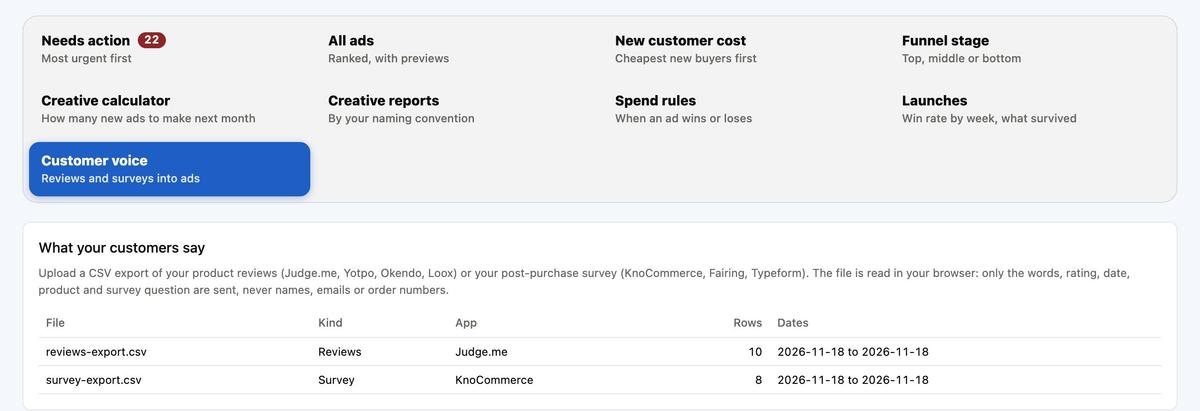
Upload your reviews and survey answers
Under What your customers say, click Upload reviews (CSV) or Upload survey answers (CSV). Export the file from your reviews app (Judge.me, Yotpo, Okendo, Loox) or your survey app (KnoCommerce, Fairing, Typeform). Other apps work too: pick Other.
- Files: CSV, up to 5 MB. Vibe9.co finds the header row and reads commas, semicolons or tabs.
- Check the columns. Vibe9.co guesses which column holds what. You confirm Customer's words (required), and if you like Rating, Date, Product and, for surveys, Survey question. The words of the first three rows show as a preview.
- Private by design. The file is read in your browser. Only the words, rating, date, product and survey question are sent. Columns with names, emails, phone numbers, customers, authors, order numbers, IP addresses or user names are never offered and never sent. The page lists them as "Left out on purpose".
- Click Add these rows. Rows with no words are skipped and counted. A row that's already here (same words, date, product and question) isn't added twice.
- Limits: the first 20,000 rows of a file, up to 4,000 characters of words per row, and 50,000 rows per dashboard.
- Dates: a date like 2026-11-03 is read as is. A date that could be read two ways, like 03/11/2026, is left blank rather than guessed.
The table lists each file with its Kind, App, Rows and Dates. Remove deletes every row that came from that file.
Themes and ad ideas
Click Find themes and ideas. You need at least 5 rows, and each dashboard gets up to 5 runs in 24 hours. A run where the AI couldn't be reached isn't counted. The page always shows the latest run.
The AI reads up to the newest 400 rows, newest date first (fewer when the rows are very long). The line under the title says exactly how many it read, for example "Read 18 of 18 rows (10 of 10 reviews, 8 of 8 survey answers)".
Themes
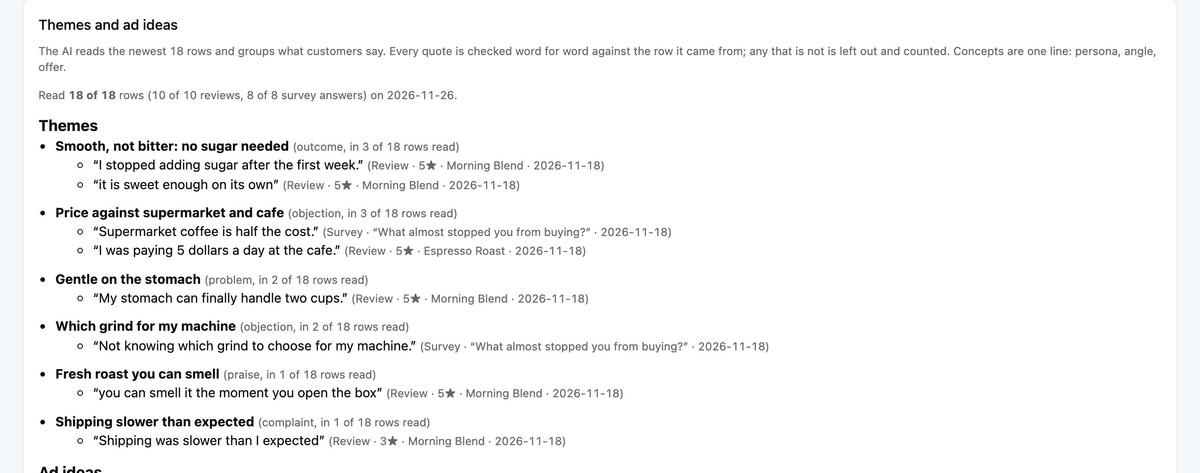
Each theme is something customers say: praise, an objection, a problem, a use, an outcome or a complaint. Next to it, how many of the rows read mention it ("in 3 of 18 rows read"). Under it, the clearest quotes, each with its source: review or survey, rating, product, the survey question and the date.
Ad ideas
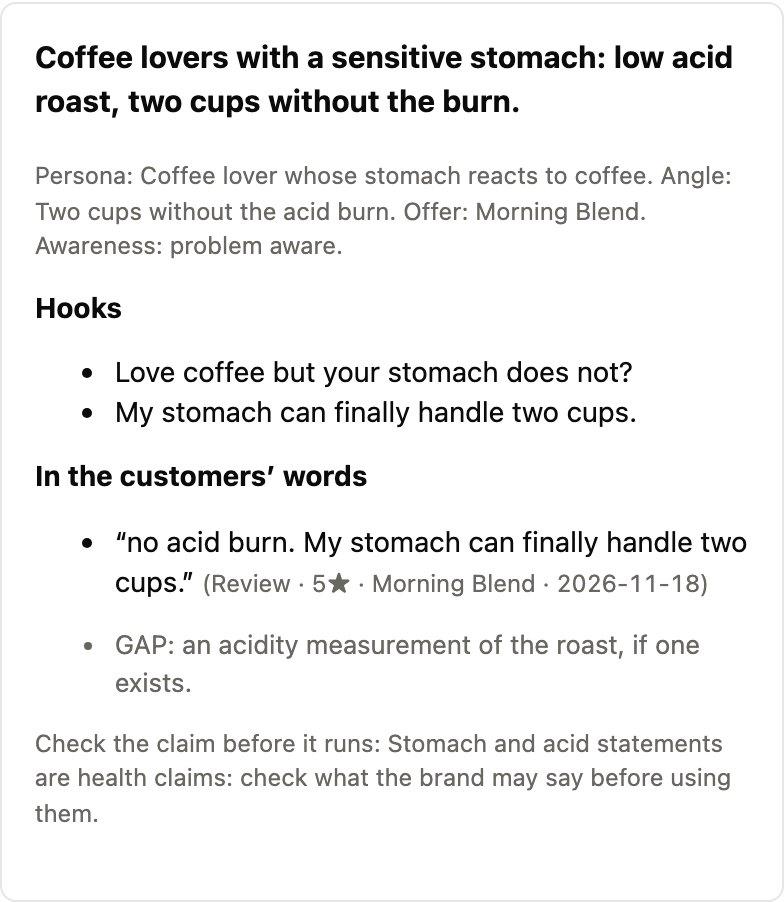
- The concept in one line, then its Persona, Angle, Offer and Awareness level.
- Hooks: up to five, written for the right person and without naming the product.
- In the customers' words: quotes that back the idea.
- GAP: proof the idea needs that the rows don't contain. If no quote backs an idea word for word, it says so.
- Check the claim before it runs: shown when an idea makes a health, beauty, supplement, weight or medical claim.
Why you can trust the quotes
The AI is told to quote word for word and never to invent results, customers, numbers or reviews. Vibe9.co then checks every quote on its server against the row it came from. A quote that isn't word for word in that row is left out, and the page says how many were dropped.
Not reached
The last list says what this run couldn't see: uploaded rows that weren't read, a source you haven't uploaded, and sources Vibe9.co doesn't connect, like support tickets, call recordings and returns reasons.
What to do with it
- Upload your newest reviews and your post-purchase survey answers.
- Click Find themes and ideas.
- Pick the concepts that are different from the ads you already run.
- Close every GAP and check every flagged claim before an ad goes live.
- Use the quotes in your hooks and scripts as they are.
Good to know
- Vibe9.co doesn't change anything in your ad account. You brief and launch the ads yourself.
- New uploads change the next run, not the last one. Run it again after you add rows.